
Understanding Salesforce Platform Event Delivery Limits
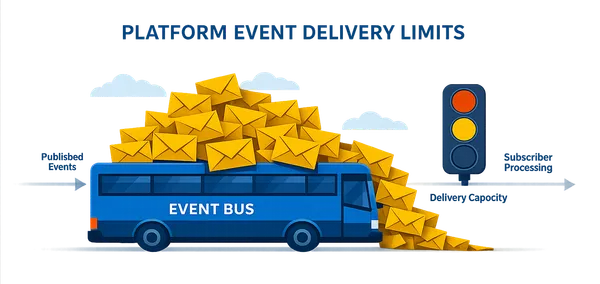
I’ll never forget the Monday morning a critical alert from Salesforce Signature Success landed in my inbox: a production org I was responsible for had completely consumed its platform event delivery allocation. My first instinct was to start digging through integrations, checking for runaway Apex triggers, or looking for a sudden publishing spike. The actual cause? One browser tab left open overnight.
That experience taught me something important: platform event limits are deceptively easy to misunderstand. Publishing an event and delivering that event to subscribers are separate concerns, and the subscriber type determines whether a delivery consumes the shared daily allocation. I had no idea at the time, and I suspect many developers don’t either.
This post walks through the real investigation I conducted on that production incident. The org used platform events for operational logging and kept processing logs without issue, but its API delivery allocation had quietly hit zero. I’m sharing this so you don’t have to learn this lesson the hard way.
⚡ TL;DR
Section titled “⚡ TL;DR”- A single long-running
EmpApisubscriber can exhaust the org-wide platform event delivery allocation. - Delivery allocation applies to API subscribers (
EmpApi, CometD, Pub/Sub API), not internal non-API subscribers such as Apex triggers and record-triggered event flows. - Symptom pattern: Apex continues to process and log events, but API-based subscribers quietly stop receiving events once delivery allocation is exhausted.
- Practical fix: control long-lived subscriptions with a feature flag, session timeout, or explicit unsubscribe behaviour.
- Operational rule: when incidents happen, audit external API subscribers before investigating internal processing.
🧩 What Actually Happened
Section titled “🧩 What Actually Happened”Salesforce’s notification pointed to one event channel in particular: /event/LogEntryEvent__e, the backbone of a logging solution. But what stood out was not just the channel itself. The alert highlighted that a single user was responsible for consuming the vast majority of the platform event delivery allocation.
The logging solution was still creating Log records without issue and seemingly working normally, but the delivery limit had hit zero. That raised the obvious question: how can event processing continue if deliveries are supposedly exhausted?
📏 How Platform Event Delivery Limits Work
Section titled “📏 How Platform Event Delivery Limits Work”Salesforce separates two allocation types for platform events:
- Publishing allocation: How many platform event messages the org can publish in an hour.
- Delivery allocation: How many event notifications Salesforce can deliver to API subscribers over the last 24 hours.
Exact allocations vary by org entitlement, edition, license mix, and any add-ons, so confirm your current numbers in Salesforce Setup and the official limits documentation before making architectural decisions.
This article assumes you already know how publish and subscribe works on the platform. If that part is new, the Platform Events section of the integrations guide covers event definitions, the event bus, replay IDs, and why events behave nothing like queryable records.
The delivery side is what trips people up. Deliveries are counted for API-based subscribers, but not for Salesforce’s internal non-API subscribers. The important unit is not simply “events published”; it is closer to events delivered × API subscribers. One event delivered to five separate API subscribers consumes five deliveries.
For example, if your org has a delivery allocation of 1,000,000 events per day and one browser session stays subscribed while 10 events per second are published, that one session alone can consume about 864,000 deliveries in 24 hours.
It is also why teams should track Streaming API limits Salesforce applies to event consumers, not just event publish volume.
| Subscriber type | Counts against platform event delivery allocation? | Notes |
|---|---|---|
| Apex platform event trigger | No | Runs inside Salesforce as a non-API subscriber. |
| Platform-event-triggered Flow | No | Internal automation does not consume the API delivery pool. |
Lightning component using EmpApi |
Yes | Common in live viewers, consoles, dashboards, and admin utilities. |
| CometD streaming client | Yes | Includes external or browser-based Streaming API clients. |
| Pub/Sub API consumer | Yes | External event consumers receive API deliveries. |
| Event relay or external integration | Yes | Delivery usage can grow quickly if multiple consumers subscribe to the same channel. |
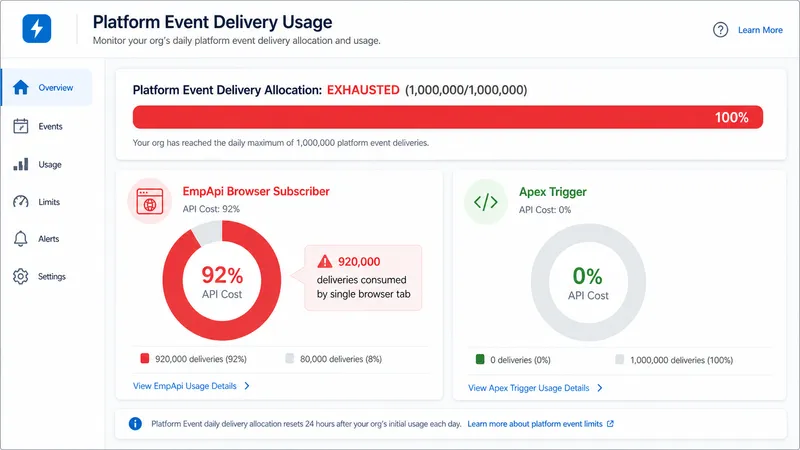
That explains the earlier confusion: even though the API delivery quota was gone, the Apex trigger that stored the log records could still run because Apex-based processing does not use the delivery pool.
When the delivery allocation is exhausted, the failure mode is usually:
- API subscribers stop receiving events (for example
EmpApi, CometD, and Pub/Sub API consumers). - Apex and internal automation continue processing because they are non-API subscribers.
- Recovery depends on the subscriber design. Salesforce retains platform events for 72 hours, but a client must store and resume from replay IDs (or use a supported managed subscription) to retrieve retained events after reconnecting. Retention is not the same as guaranteed catch-up.
You can confirm allocation behaviour in the official Platform Events Developer Guide. For reconnection design, use the Pub/Sub API event durability guidance, which documents the 72-hour retention window and replay behaviour.
🎯 The Real Cause
Section titled “🎯 The Real Cause”Eventually the investigation landed on one open browser tab. An admin had left a page of the logging solution open overnight; a page that displayed live log event data using a Lightning component subscribed to the event through the EmpApi.
In practical terms, this was an EmpApi delivery consumption issue, not a publishing throughput problem.
That subscription stayed active for hours and kept receiving event data continuously. Every one of those messages counted as an API delivery, and over time they added up until the org’s daily limit was gone.
Nothing had malfunctioned. The org was behaving as designed, but the subscription pattern made it easy for a normal admin action to consume a shared allocation unintentionally.
🔍 How to Diagnose the Same Problem
Section titled “🔍 How to Diagnose the Same Problem”If you receive a platform event delivery alert, do not stop at publish volume. Work through the subscriber side as well:
- Identify the affected event channel. Confirm whether the alert points to one event, such as
/event/LogEntryEvent__e, or a broader set of platform events. - Separate publishers from subscribers. High publishing volume matters, but the delivery allocation is consumed when API subscribers receive messages.
- List API-based listeners. Look for Lightning components using
EmpApi, CometD clients, Pub/Sub API consumers, event relays, middleware, and monitoring tools. - Check browser-based viewers. Admin consoles, live log pages, dashboards, and diagnostic screens can quietly stay subscribed while a tab is open.
- Review usage in Setup or monitoring tools. Use the Salesforce usage views available in your org, and Event Monitoring if licensed, to identify spikes before the daily allocation is exhausted.
- Confirm internal automation behavior. Apex platform event triggers may still process events even when API delivery allocation is exhausted, which can make the incident look inconsistent at first.
🔧 What Was Done Next
Section titled “🔧 What Was Done Next”To make sure the same issue did not surface again, the team used the logging solution’s existing Custom Metadata Type switch that controls whether the real-time event stream is active. This feature had always been part of the logging solution, but in day-to-day operations it was easy to leave the stream enabled even when no one needed to watch events in real time. By turning the switch off, the team ensured that no one would accidentally open long-running EmpApi subscriptions that quietly consume delivery allocations.
The logging pipeline itself kept functioning exactly as designed. Apex-driven event handling continued uninterrupted, but the real-time viewer was now explicitly disabled until someone intentionally re-enabled it. This small configuration change removed the risk of background listeners burning through the delivery quota again.
A pattern like this is especially valuable in monitoring or diagnostic features that are only needed occasionally. A simple configuration flag gives teams a safe default (“off”), a clear operational choice (“turn it on when required”), and a fast rollback path if usage spikes unexpectedly. If you have not built one of these before, the custom metadata types guide works through a feature flag registry from the type definition onwards.
🔒 How to Prevent Repeat Incidents
Section titled “🔒 How to Prevent Repeat Incidents”For platform-event-backed monitoring, logging, and dashboard features, the safest design is to make live subscriptions intentional and temporary.
- Default real-time viewers to off. Use Custom Metadata Types, Custom Settings, or another feature flag so diagnostic streams are enabled only when needed.
- Disconnect idle subscriptions. Browser-based
EmpApicomponents should unsubscribe when the user navigates away, closes a modal, becomes idle, or no longer needs the live feed. - Show visible “live stream active” state. Make it obvious when a page is consuming platform event deliveries.
- Set sensible session timeouts. Long-running admin tabs are easy to forget; automatically stop the stream after a defined period.
- Monitor delivery usage, not just publish volume. A healthy publisher can still cause trouble if too many API subscribers are listening. Treat this as one more limit signal alongside the storage, drift, and security checks in org health and monitoring.
- Document who owns each subscriber. Treat event subscribers like integration endpoints: name the owner, purpose, expected volume, and operational runbook.
🏁 Conclusion
Section titled “🏁 Conclusion”- Know your subscribers. Apex and platform-event-triggered Flows do not count against API delivery allocations.
EmpApi, CometD, and Pub/Sub clients do. - Monitor platform event usage. Watch delivery statistics in Setup or Event Monitoring to spot an issue before Salesforce does.
- Throttle or timeout embedded subscriptions. Dashboards and monitoring tools that use
EmpApishould disconnect when not in use. - Share the quota wisely. Delivery allocations are shared org-wide, so one chatty subscriber can impact everyone else.
- Use configuration switches. Features controlled by custom metadata or settings make it easy to adjust behaviour without a deployment.
Platform events are a powerful way to connect processes and systems, but like any shared resource, they need operational guardrails. If your org uses platform events for logging, dashboards, monitoring, or integrations, audit your API-based subscribers before the next incident. The risky part may not be who is publishing. It may be who is listening.