
Salesforce MCP Setup: Agentforce & Hosted Servers

Part 2 of 2 in the Salesforce MCP in Summer ’26 pair: setup and release. Start with Part 1: architecture and adoption.
Agentforce can consume external MCP tools, and external AI clients can consume Salesforce capabilities through Hosted MCP Servers. The companion article, Salesforce MCP in Summer ’26, covers what those two patterns are, how their identity models differ, and when MCP is the right contract at all. This guide turns that model into two bounded, reproducible builds.
It takes you from registration through verification in each direction: registering a third-party MCP server in Agentforce Registry and turning one allowlisted tool into an agent action, then activating a Salesforce Hosted MCP Server and connecting to it from Postman with per-user OAuth. Neither walkthrough is a production template. Both avoid business data and deliberately start with a narrow, read-oriented surface: the public Microsoft Learn MCP Server for the outbound example and the standard SObject Reads server for the inbound example.
The two directions have separate onboarding, identity, and governance surfaces, so work through the one you are building. The pre-activation checklist at the end applies to both.
⚡ Choose Your Direction
Section titled “⚡ Choose Your Direction”The two walkthroughs are independent. Start with the one that matches what you are building.
🧾 Before You Begin
Section titled “🧾 Before You Begin”Keep the two identity models separate. When Agentforce consumes an external server, the provider sees either no authenticated caller or the shared application identity used by client credentials; Salesforce does not delegate the identity of the person speaking to the agent. When an external client consumes Salesforce through Hosted MCP, each call runs as the named Salesforce user who authorised the connection, with that user’s permissions and sharing access. That difference should shape the test identity, credential controls, approval, and audit evidence for the walkthrough you choose.
Availability has several layers, and a connection that cannot be licensed is not worth designing. Validate the platform edition, the Agentforce entitlement, and every product behind the tools before you start either walkthrough. The edition and entitlement table in the architecture article remains the canonical summary; the local prerequisite tables cover what you need for these two examples.
Each walkthrough below lists its own prerequisites: Setup One needs an agent and admin permissions, while Setup Two needs API Catalog access and permission to create External Client Apps.
📥 Setup One: Let Agentforce Use a Third-Party MCP Server
Section titled “📥 Setup One: Let Agentforce Use a Third-Party MCP Server”The fastest route to a poor MCP implementation is to start with a large server and allow every tool because the connection works. A better pilot begins with one read-oriented question and one carefully reviewed server. To make this walkthrough reproducible without external credentials or business data, the follow-along example uses the official Microsoft Learn MCP Server.
This walkthrough specifically covers a third-party server registered through Agentforce Registry. Salesforce also supports manual registration of external MCP servers in API Catalog when the connection uses no authentication or OAuth 2.0 client credentials; advanced OAuth 2.1 configuration remains an Agentforce Registry path. MuleSoft servers are managed through API Catalog. The agent ultimately receives actions in each case, but the onboarding and governance surfaces are not interchangeable.
Before you begin, confirm the following prerequisites:
| Requirement | Summer ’26 expectation |
|---|---|
| Agent | Agentforce Service agent or Agentforce Employee agent created in the new Agentforce Builder |
| Salesforce setup | Einstein generative AI and Agentforce enabled |
| Server transport | Streamable HTTP, not legacy HTTP+SSE or local stdio |
| Authentication | No authentication or OAuth 2.0 client credentials |
| Admin access | Manage AI Agents plus the permissions required for the agent type |
| First environment | Sandbox with a new test agent |
🎓 Follow along with Microsoft Learn
Section titled “🎓 Follow along with Microsoft Learn”The Microsoft Learn MCP Server is public, free to use, and requires no authentication. Its Streamable HTTP endpoint exposes tools that search and retrieve public Microsoft technical documentation, which makes it a low-risk way to exercise the Agentforce registration path.
| Field | Follow-along value |
|---|---|
| Server name | MicrosoftLearn |
| Description | Retrieve and summarise current Microsoft technical documentation |
| Server URL | https://learn.microsoft.com/api/mcp |
| Authentication | No Authentication |
| First tool | microsoft_docs_fetch |
| Test outcome | Summarise a supplied Microsoft Learn page and include its source URL. |
This example exercises registration, validation, tool review and allowlisting, action creation, instructions, testing, and tracing. It does not exercise OAuth client credentials.
For a protected production server, the registration sequence is similar but the operating model is not. With OAuth 2.0 client credentials, Salesforce authenticates to the provider’s authorisation server with a client ID and secret and receives a token for a shared application identity. Every agent using that registration reaches the provider through that identity; the person speaking to the agent is not delegated.
Scope the external application to only the data and operations its allowlisted tools need. Store and rotate the secret through the approved credential process, test token expiry and revocation, and confirm that provider logs identify the application and the requested operation. These controls belong in the production design even though the public Microsoft Learn example does not exercise them.
The sequence has four phases: Scope (steps 1–2), Register (steps 3–4), Govern (steps 5–7), and Prove (steps 8–10).
-
Define one bounded outcome. Write down exactly what the external tool must return and what the agent is allowed to do with the result. For the follow-along example, the outcome is to summarise one supplied Microsoft Learn page and include its source URL.
-
Review the server before connecting it. Confirm that it is operated by a trusted provider, uses Streamable HTTP, responds within the expected time, publishes understandable schemas, and supports one of Agentforce’s authentication patterns.
-
Register the server. In Setup, search for
Agentforceand open Agentforce Registry. Select Registered MCP Servers, then select New. Register a server from scratch or browse pre-packaged servers in AgentExchange. For direct registration, enter the server name, description, URL, authentication method, and required authentication details, then select Create and Continue. If you are following the example, use the values in the callout above. -
Let Salesforce validate the connection. Salesforce creates the supporting connection records and management permission set, then pings the server to validate the connection. OAuth client-credentials registrations also store the authentication configuration used to obtain tokens. The management permission set is assigned to the registering admin so they can manage the registration; it is not the runtime identity of the person speaking to the agent.
-
Review and allowlist the tools. Review each tool’s name, description, and schema. If Salesforce shows an overall server risk score and individual tool scores, treat them as additional risk indicators; the feature has been rolling out since July 2026 and might not yet appear in every eligible org. No score does not mean that a tool is safe. For the verified follow-along path, select only
microsoft_docs_fetch, then select Allow and Continue. -
Finish the registration. Allowlisting decides which server tools Salesforce can turn into agent actions. An Agentforce Gateway policy is an optional second layer that limits how those actions can use the connection at runtime. The Microsoft Learn sandbox example does not require one: if no applicable policy is shown, leave the policy selection empty and select Save. The completed registration should show
microsoft_docs_fetchas an allowed tool. -
Add the generated actions to the agent. Each allowlisted tool appears in Agentforce Assets as an action named after the pattern
Tool Name ServerName. In the follow-along example,microsoft_docs_fetchbecomesMicrosoft Docs Fetch MicrosoftLearn. In the new Agentforce Builder, open a draft of your agent, select the relevant topic or subagent, add the action from the asset library, and save the draft. -
Write instructions around the tool. State when to use it, which inputs must be collected first, how to handle no result or timeout, which returned fields may be shown to the user, and when to escalate instead of retrying. The follow-along instruction appears below the steps.
-
Test selection as well as execution. Preview requests that should call the tool, requests that should not call it, missing inputs, permission failures, timeouts, malformed responses, and conflicting tools. For the follow-along example, ask, “Read https://learn.microsoft.com/en-us/training/support/mcp and tell me which transport and authentication requirements it documents. Include the source URL.” Then use an unrelated prompt, such as “What is 17 multiplied by 24?”, and confirm that it does not invoke the documentation tool. Use Agentforce Testing Center for repeatable scenarios.
-
Inspect tracing before activation. In Builder trace data, confirm that an in-sync MCP action appears in the
Available Actionsevent. Salesforce removes an out-of-sync action from the agent’s reasoning when its captured tool contract no longer matches the server.
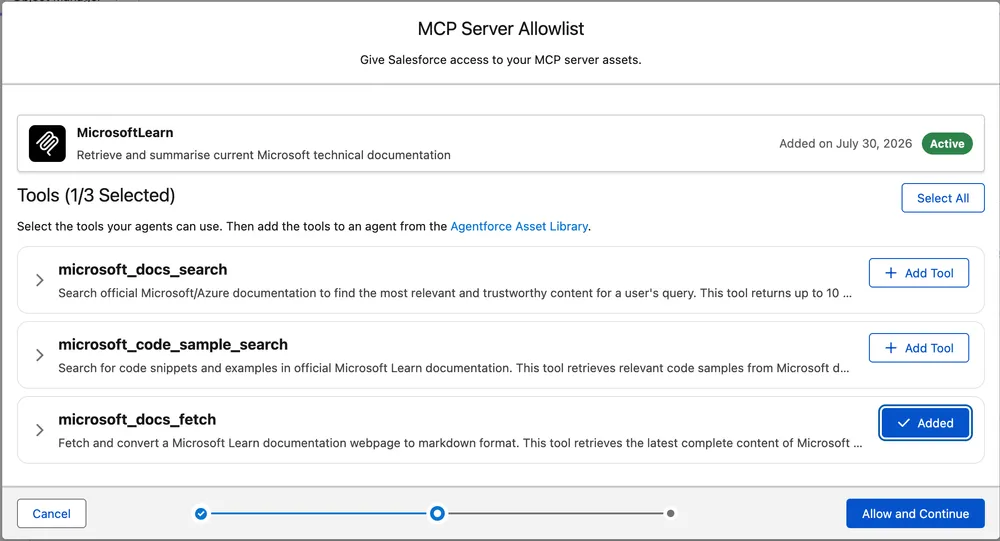
🧯 If allowlisting fails
Section titled “🧯 If allowlisting fails”Do not assume that the failed screen rolled back every supporting record. In a July 2026 sandbox test, microsoft_docs_fetch completed the allowlist step, while microsoft_docs_search returned a Salesforce internal error. The failed search attempt still created an MCP Server entry in API Catalog. Treat this as an observed compatibility edge rather than documented behaviour that every org will reproduce. If it happens, record the error reference and timestamp, then check Agentforce Registry, API Catalog, and Agentforce Assets before retrying.
A reasoning instruction for the Microsoft Learn example could look like this:
Use microsoft_docs_fetch when the user supplies a Microsoft Learn URL and asksabout that page. Pass the URL to the tool, base the answer on the returneddocumentation, and include the source URL. Do not use this tool for unrelatedquestions. If the page cannot be retrieved, say that you could not verify itscontent from Microsoft Learn instead of guessing.This instruction improves tool selection and failure behaviour, but it does not replace server permissions or a Gateway policy. Treat returned content as untrusted too: deterministically validate any value used in a later tool call or Salesforce write. The architecture article’s Treat tool output as untrusted input section explains the wider indirect prompt-injection boundary.
Salesforce’s MCP implementation guide brings the registration, trust checks, action setup, and tracing behaviour together.
🚪 Gateway Policies and Allowlisting
Section titled “🚪 Gateway Policies and Allowlisting”Allowlisting selects which server tools Salesforce can turn into agent actions. Gateway policies add runtime controls such as quotas and tool-by-name access rules. The architecture article’s policy section explains the boundary; here, focus on proving that the required policy covers the server and intended agents.
For a production connection, create policies from Setup → Policies before applying them to an MCP server. A quota policy caps the number of calls in a time period. An MCP attribute-based access control policy allows or blocks tools by name.
You can apply a policy manually to selected servers or use matching criteria so that current and future servers with a matching source or name receive it automatically. Unless you narrow the policy to selected agents, it applies to every agent that calls the protected connection. After applying one, confirm that both the server and, where relevant, the intended agent appear in the policy’s targets.
📤 Setup Two: Expose Salesforce Through a Hosted MCP Server
Section titled “📤 Setup Two: Expose Salesforce Through a Hosted MCP Server”The reverse direction is useful when people already work in an MCP-compatible assistant and need governed access to Salesforce. Instead of giving that client broad REST API access or building a new proxy, you activate a focused server and let each person connect with their own Salesforce identity.
The safest first test uses Postman and the standard read-only SObject server. Postman shows the raw protocol and authentication response without adding model interpretation, which makes it easier to separate a connection problem from an agent reasoning problem.
Before you begin, confirm the following prerequisites:
| Requirement | Summer ’26 expectation |
|---|---|
| Salesforce org | Lightning Experience in Developer, Enterprise, Performance, or Unlimited Edition, with Salesforce Hosted MCP Servers available and API access enabled |
| Admin access | System Administrator or equivalent access to create the External Client App, plus access to manage MCP servers in API Catalog |
| Test client | Postman Desktop or Postman on the web, using an MCP request over HTTP and OAuth 2.0 authorisation code with PKCE |
| Runtime user | A representative non-admin user with access to the intended objects, fields, and records. Before production, control External Client App pre-authorisation through a dedicated permission set. |
| First environment | Developer Edition or a sandbox. In a scratch org, create the External Client App in a Dev Hub org, add it to a package, and install the package in the scratch org rather than trying to create it directly in Setup. |
The sequence has four phases: Select (steps 1–2), Secure (steps 3–5), Connect (steps 6–7), and Prove (steps 8–9).
-
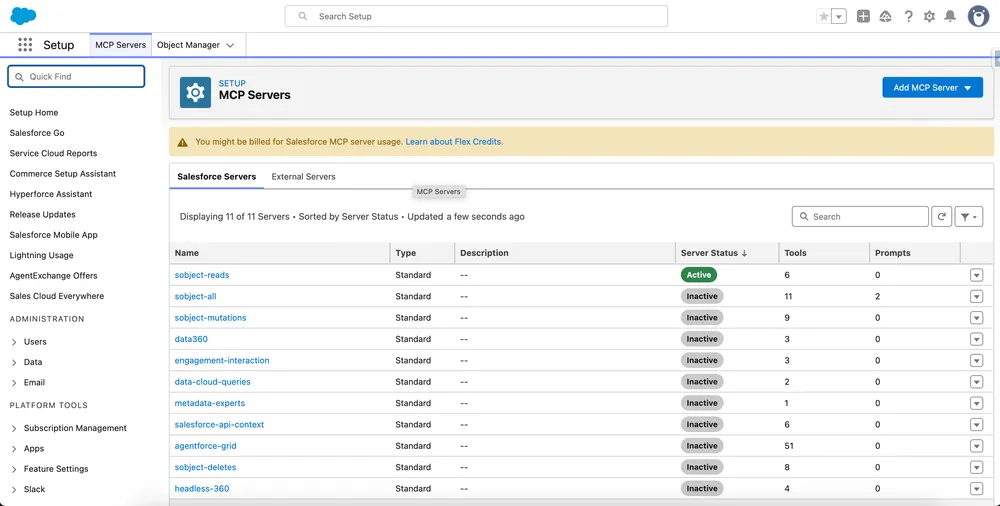
Choose a restricted server. In Setup, search for
MCP Serversunder API Catalog. Start with the standardplatform/sobject-readsserver, which provides read and query operations without mutations. Use Salesforce’s Standard MCP Servers Reference to check the current server options and tool sets rather than relying on a fixed list. Standard servers are inactive by default. -
Activate the server intentionally. Review its fixed tool set, then activate it. Activation can take a short time. If you later need a narrower or mixed capability set, create a persona-specific custom server rather than enabling a broad standard server for everyone.
-
Create and configure a dedicated External Client App. In External Client App Manager, create one app for Postman. Salesforce’s current third-party client guide requires an External Client App for this connection and says a Connected App cannot be used for MCP authentication. Enable OAuth and enter the callback URL for the Postman surface you are actually using:
https://oauth.pstmn.io/v1/callbackfor the Postman Desktop app, orhttps://oauth.pstmn.io/v1/browser-callbackfor Postman on the web. AddAccess MCP servers (mcp_api)andPerform requests at any time (refresh_token, offline_access). Under Security, select Issue JSON Web Token (JWT)-based access tokens for named users, then create the app. This setting makes Salesforce issue the named user’s access token as a signed JWT instead of an opaque token. It does not select the OAuth JWT bearer flow: Postman still authenticates the user with the authorisation-code flow and PKCE in step 7. -
Restrict who can connect. Change the app policy from broad user approval to pre-authorised users controlled by a dedicated permission set. Consider IP restrictions where the client has stable documented ranges, shorten refresh-token validity, enable refresh-token rotation, and configure single logout where immediate revocation matters.
-
Retrieve the consumer key and allow the app to propagate. Open the app in External Client App Manager, select Settings, then select Consumer Key and Secret under OAuth Settings. Complete any identity-verification prompt and copy the Consumer Key; this is the value Postman calls the Client ID. Do not copy the consumer secret for this PKCE test. Salesforce notes that a new External Client App can take up to 30 minutes to become operational, so an immediate OAuth error can be propagation rather than incorrect configuration.
-
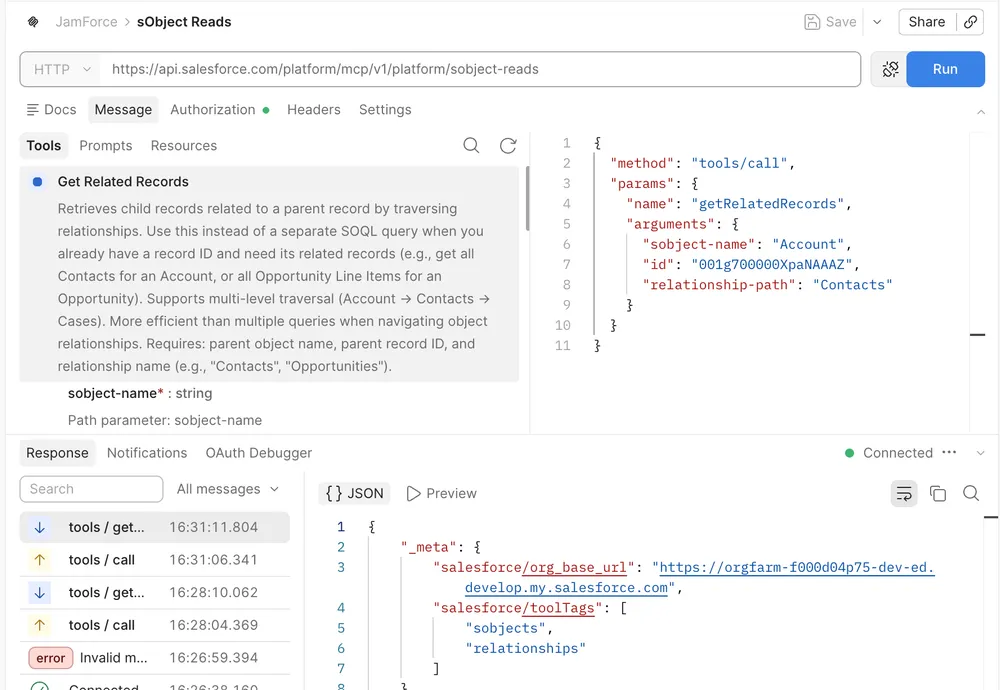
Create an MCP request in Postman, not a normal HTTP request. In Postman, select + → MCP to create the MCP request or create a request, then select the icon beside the Untitled Request label and select MCP. In the main text input below that label, switch the transport dropdown from STDIO to HTTP, then paste the server URL for your environment:
Production: https://api.salesforce.com/platform/mcp/v1/platform/sobject-readsSandbox: https://api.salesforce.com/platform/mcp/v1/sandbox/platform/sobject-reads -
Configure OAuth with PKCE. In Postman’s Configure New Token panel, select Authorization Code (With PKCE) and use the endpoints for your environment:
Production orgAuth URL: https://login.salesforce.com/services/oauth2/authorizeAccess Token URL: https://login.salesforce.com/services/oauth2/tokenSandbox or scratch orgAuth URL: https://test.salesforce.com/services/oauth2/authorizeAccess Token URL: https://test.salesforce.com/services/oauth2/tokenSet Client ID to the Consumer Key from step 5, leave Client Secret blank, select SHA-256 as the code-challenge method, and enter
mcp_api refresh_tokenin Scope. Confirm that the Callback URL displayed by Postman is character-for-character identical to the value configured in step 3, including its path and lack of a trailing slash. For Postman Desktop, select Authorize using browser. Select Send client credentials in body. Postman generates the PKCE code verifier; you do not need to supply one manually. -
Authenticate as a restricted test user. Do not use a System Administrator as the acceptance test. Confirm that the tool can retrieve records the user can see and cannot retrieve restricted objects, fields, or records.
-
Inspect audit data before adding an AI client. In Setup, search for Event Log File Browser, select the API Total Usage event type, and inspect the event-log CSV. The legacy-auth inventory explains how to download these files through the browser or retrieve them through Salesforce CLI and the
LogFileURL. FilterAPI_CLIENT_CATEGORYforSALESFORCE_HOSTED_MCP, then review fields such asUSER_NAME,CLIENT_IP, andSTATUS_CODEalongside the affected entity. Confirm that your org has the required Event Monitoring access and retention before making these logs part of an operational or compliance control.
The first checkpoint is deliberately narrow: sobject-reads is active, while the broader all-operation, mutation, and delete servers remain inactive.
After OAuth succeeds, Postman should show a connected MCP request, the server’s available tools, and the response from a selected tool. This example uses a Developer Edition org, so it connects through the non-sandbox endpoint.
The Hosted MCP guide contains the current setup, client-specific callback URLs, server references, and troubleshooting paths.
🔎 Prove More Than Connectivity
Section titled “🔎 Prove More Than Connectivity”A successful registration or tools/list response proves that one client reached one server with an accepted authentication path. It does not prove that the right tool will be selected, that the runtime identity is sufficiently restricted, or that an operator can investigate what happened later. Before treating either walkthrough as complete, collect evidence at four levels.
| Proof | Question it answers | Evidence to retain |
|---|---|---|
| Connection | Can the intended client reach and authenticate to the intended server? | The Agentforce registration validation or the Hosted MCP OAuth and tools/list result, including the environment and endpoint used. |
| Contract | Does the client see the intended, current tool definitions? | For Agentforce, the allowlisted tools, generated actions, and in-sync Available Actions trace entry. For Hosted MCP, the expected tool list and schemas from the selected standard or custom server. |
| Authority | Can the runtime identity do what it should, and fail where it should not? | A permitted operation and a deliberately prohibited operation using the provider’s application identity or a representative Salesforce user. For an intentionally public server, confirm that the result is limited to public, read-only information. |
| Operation | Can the team explain selection, execution, failure, and impact? | Agentforce trace data and provider logs for the outbound pattern, or Hosted MCP API usage events for the inbound pattern, correlated to the test and its outcome. |
Keep the negative tests. An access-denied result is useful evidence that the boundary exists; removing permissions until a positive test barely works is not a substitute for proving what the identity cannot reach. The checkpoint above establishes a technical baseline. The checklist below decides whether the connection is safe and supportable enough to release.
✅ Pre-Activation and Release Checklist
Section titled “✅ Pre-Activation and Release Checklist”Complete the shared checks below, then use the direction-specific list for the pattern you are releasing. These checks turn the evidence above into an operational acceptance decision with explicit ownership, monitoring, and recovery.
🤝 Apply to either pattern
Section titled “🤝 Apply to either pattern”- Fix the release boundary. Record the business outcome, owner, intended users or agents, data classification, and exact tool set. Classify each tool as read-only, mutating, or destructive, and define any human confirmation or reconciliation required before you expose it.
- Establish where data is processed. Record which fields and record types may leave each system through requests or results, the hosting and processing locations of the client, server, and any model or infrastructure providers, and whether personal information crosses a jurisdictional boundary. Confirm retention, logging, training use, and subprocessor arrangements at each receiving party, and route the decision to your privacy or legal owner when personal information is in scope.
- Validate each target environment. Confirm current feature availability, edition, Agentforce entitlement where relevant, API access, product licences, underlying limits, and expected credit consumption. Treat the sandbox and change-management lifecycle as part of the release evidence; do not infer production readiness from the source org.
- Review the tool contract. Confirm that names and descriptions make the selection boundary clear, inputs and outputs fit the consuming client, results are bounded, and behavioural annotations are accurate. Treat annotations as hints rather than enforcement.
📥 If Agentforce consumes an external server
Section titled “📥 If Agentforce consumes an external server”- Approve the provider and connection. Verify who operates the server, its endpoint, Streamable HTTP support, authentication, data handling, retention, processing locations, support path, and change-notification process. Treat a Salesforce risk score as one input to that review, not as approval.
- Rebind the agent in the target org. Before deployment, register the server and allowlist the required tools in the target org. After deployment, remove the non-working MCP action references and replace them with actions generated in that org’s asset library.
- Prove the runtime identity. Confirm that the external credential has only the access the tools require and that the provider records the expected application identity. Document that the person speaking to Agentforce is not delegated to the external server.
- Verify Gateway coverage where policy is required. Confirm that each access-control or quota policy targets the intended server, tools, and agents. For criteria-based policies, wait for synchronisation or run the immediate sync before testing; registration alone does not prove that the connection is protected.
- Verify action selection and availability. Add only the required target-org actions to the relevant agent or subagent, test prompts that should and should not select them, and confirm that each in-sync action appears in the
Available Actionstrace event.
📤 If an external client consumes Salesforce
Section titled “📤 If an external client consumes Salesforce”- Expose only the intended Salesforce surface. Activate only the required standard servers, or deploy and verify a focused custom server. Salesforce’s current security guidance does not make an External Client App a per-server authorisation boundary; use server activation or curation and the user’s Salesforce permissions to constrain the exposed surface.
- Check how the client handles Salesforce data. A Hosted MCP call runs with the user’s permissions, but its result then leaves Salesforce for the client and any model or infrastructure providers the client uses. Confirm where they process and retain the content, whether they use it for model training or service improvement, and whether subprocessors or cross-border transfers apply. Check the answer against your organisation’s residency, privacy, and supplier requirements.
- Configure the client registration Salesforce documents. For a third-party client, bind it to a dedicated External Client App and verify the exact callback URL,
mcp_apiandrefresh_tokenscopes, JWT-based access tokens for named users, consumer key, server URL, environment, and PKCE behaviour. Require a client secret only when the client can protect it, such as a server-side web application. Salesforce documents Vibes separately as not requiring an External Client App, so follow its current setup instructions instead of assuming the third-party pattern applies. - Harden the app for production. Restrict access to pre-authorised users through a dedicated permission set, set a deliberate refresh-token lifetime, enable refresh-token rotation, and configure single logout where immediate session revocation matters. Apply IP restrictions only when the client has stable ranges that fit the allowlist.
- Test positive and negative access. Authenticate as a representative non-admin user and prove both what the client can access and what it cannot. Cover object permissions, field-level security, sharing, restricted operations, expired sessions, and revoked access.
- Prove the audit path. Confirm that Event Monitoring access and retention meet the operating requirement, then locate the user’s Hosted MCP calls in API Total Usage data with
API_CLIENT_CATEGORY = SALESFORCE_HOSTED_MCP. Verify the user, client IP, status, affected entity, and the evidence needed to investigate an incident.
🏁 Before you accept the release
Section titled “🏁 Before you accept the release”- Run repeatable tests in the safe environment. For Agentforce, use Testing Center only in a sandbox because tests can modify CRM data. For Hosted MCP, prove authentication and tool responses with a direct client such as Postman before adding model behaviour. Then run one controlled smoke test in the target org.
- Exercise failure and recovery paths. Cover missing and invalid inputs, authentication and permission failures, expired or revoked tokens, timeouts, unsupported or changed schemas, out-of-sync or unavailable tools, quota and downstream failures, retries, duplicate requests, and partial side effects. Prove idempotency or define reconciliation where a retry can repeat work.
- Check capacity and cost. Compare expected volume and latency with MCP and Atlas timeouts, provider rate limits, Salesforce API and governor limits, product credits, Agentforce consumption, and any Gateway quota. Record the threshold that should warn the support team before users experience failure.
- Make the evidence operational. Confirm who monitors Agentforce trace and usage data, provider logs, Hosted MCP events, latency, errors, and business outcomes. Record the correlation values and alert route needed to follow one request across the systems involved.
- Record acceptance and recovery ownership. Name the owners of the server, actions, policy, External Client App, credentials, monitoring, business process, and incident response. Obtain acceptance against the agreed outcomes, and document how to disable the action or server, revoke credentials or tokens, communicate the interruption, and replay or reconcile affected work.
🎯 Final Thoughts
Section titled “🎯 Final Thoughts”Both walkthroughs deliberately keep the capability surface narrow: Setup One allowlists one read tool, while Setup Two activates the read-only SObject server. Test each path in a safe non-production org with a representative restricted user before anything reaches production. That is the right size for a first release. Expanding the tool set is the easy part, and it is much easier to justify once you can show that identity, policy, audit evidence, and recovery all behaved as designed on a small surface.
Two things carry across both directions. Setup screens change between releases, so treat the exact labels here as a guide and confirm them in your org. And a working connection is not a finished release: the pre-activation checklist above is what turns a successful test into an operational decision someone owns.
For the architecture behind these steps, including how the two identity models differ and when a simpler integration is the better answer, read the companion article.