Salesforce Winter '27: What's New and What's Enforced

Winter ‘27 is a big release, and a genuinely useful one. Apex heap limits go up for every org that runs Apex, complex template expressions and third-party web components both reach general availability in Lightning Web Components (LWC), and there are new admin and security controls worth switching on.
A large share of new features lands in Flow. There is a dedicated test mode with saved scenarios and mock outputs, still in beta but the first repeatable way to test automation; an automatic retry for record-lock contention; and a run context that finally enforces the access level you intended. If you build automation, that is a lot of ground gained in one release. There is enough there to need its own article, which covers Flow testing, the new run context, and the builder changes in depth.
All of that is worth having, and it is not where most of your time will go. The weight of this release sits in the changes that carry dates: a permission enforced the moment your org upgrades, an end-of-support notice for Connected Apps, and an API retirement whose real cost is the inventory it demands. The good news is that the new features can wait for a quiet week. The dated ones arrive on Salesforce’s schedule, so those are the ones to plan around.
Beyond Flow, the Winter ‘27 highlights fall into three areas: access and permissions, integrations and APIs, and the platform changes for people who write code. It is not a catalogue of every product-cloud announcement. If you manage integrations, start with authentication: seven deadlines run from this release through to Summer ‘27. If you build on the platform, the Apex heap and LWC sections hold the additions worth adopting early. If you administer access, the permission and accessibility changes are enforced this release, not offered.
📋 The Short Version
Section titled “📋 The Short Version”If you only have five minutes, divide the release into three queues.
| Priority | What belongs in it | First action |
|---|---|---|
| Act now | SOAP login() permission enforcement, Profile Filtering, three accessibility updates, and the 30 November device-flow deadline | Test the enforced state in preview and assign only the permissions that are genuinely required |
| Plan next | Connected App support ending in Summer ‘27, API versions 31.0–40.0 retiring, and the Spring ‘27 sharing, guest-access, and Aura changes | Build one owned inventory covering integrations, affected code, sites, and release updates |
| Adopt deliberately | Higher Apex heap limits, complex LWC template expressions, third-party web components, and new admin controls | Use the new capability where it removes a real workaround, not merely because it is available |
🔐 Setup Audit Trail Gets Its Own Permission
Section titled “🔐 Setup Audit Trail Gets Its Own Permission”Setup Audit Trail is the running log of administrative changes in your org: who changed a field, who edited a permission set, who altered a sharing rule, and when. The View Setup Audit Trail page lists the 20 most recent entries, and the download covers the past 180 days, after which entries are deleted. It sits alongside login history and field history tracking in org health monitoring. Access has been bundled with the broader View Setup permission (shown in the UI as View Setup and Configuration). If you could see Setup, you could read the change history.
Winter ‘27 introduces a release update that separates the two, moving access to a dedicated View Setup Audit Trail permission assigned through a profile or permission set. The permission is available now, so you can assign it before Spring ‘27 enforcement. I could not see a Test Run option for this update in the Winter ‘27 preview org I reviewed, so activate the release update in a sandbox to validate the full behaviour safely.
💡 Why this is a sensible change
Section titled “💡 Why this is a sensible change”The audit trail is a security artefact, not a configuration screen. It tells you which administrator touched which control and when. Bundling it with general Setup visibility meant that read-only Setup access, the kind you might give a consultant or analyst, also exposed the change history.
The split works in both directions. You can remove audit history from people who only need to inspect configuration, or give an auditor access to Setup Audit Trail without granting the broader View Setup permission.
🧰 What to actually do
Section titled “🧰 What to actually do”-
Review the inherited grants. Decide which profiles and permission sets with
View Setupshould continue to expose the audit trail, then remove the new permission where it is not required. -
Separate intentional access. Put
View Setup Audit Trailin a purpose-named permission set so auditors, security staff, release managers, and integration users receive only the access their role needs. -
Test the positive access path now. Create a representative non-admin user without the broader
View Setuppermission, assign the purpose-named permission set, then verify the Setup Audit Trail page, export, and any process that queriesSetupAuditTrailfor compliance or security monitoring. -
Activate and test the release update. In a sandbox, activate the release update, then confirm that a representative user who retains
View Setupbut lacksView Setup Audit Trailcan no longer open the page, download the export, or querySetupAuditTrail.
🔑 Connected App Support Ends in Summer ‘27
Section titled “🔑 Connected App Support Ends in Summer ‘27”For teams that manage integrations, this is the largest commitment in the release. Salesforce ends support for Connected Apps in Summer ‘27 through the Migrate All Connected Apps to External Client Apps release update.
If you have not met the replacement yet, an External Client App is Salesforce’s next generation of the Connected App. It registers an external system and holds its OAuth settings and scopes. Salesforce redesigned the model to improve security, address the packaging and distribution problems Connected Apps have, and separate proprietary developer settings from the policies an admin sets. External Client Apps cover all but a few Connected App use cases.
The wording of the release update matters. The update does not disable Connected Apps on its enforcement date. They keep working, but Salesforce will no longer fix bugs or provide support for the integrations and authorisation flows that use them. A critical integration can therefore carry on running against a part of the platform Salesforce has stopped maintaining.
The release update applies to Lightning Experience in Enterprise, Unlimited, and Developer editions. It is available from this release and enforced for production instances in Summer ‘27.
Start with Salesforce’s migration eligibility checks. The migration button appears only when the app meets the requirements. User Provisioning, a custom Apex handler, Canvas, Dynamic Client Registration, some SAML and notification configurations, and single sign-on can prevent automated migration. The tool also cannot detect the username-password flow, which External Client Apps do not support. Change that authentication flow before migrating the app.
For an eligible app that passes the authentication check, open it from App Manager in Setup and click Migrate to External Client App. The automated process creates the External Client App and saves the original as a read-only version. Do not delete the original: both apps share the same consumer, and Salesforce has not yet published safe deletion guidance. The larger cost is the inventory: knowing every app you have, who owns it, and what breaks if its authentication changes.

The migration tooling improved as well, in a change that reaches wider than the release update does, covering Group, Essentials, Professional, Enterprise, Performance, Unlimited, and Developer editions. It now handles Connected Apps packaged in first- or second-generation managed packages, as well as unpackaged apps distributed to external or other internal orgs. Customer OAuth flows, tokens, and active sessions remain valid through the package upgrade, so the people using an installed app do not have to reauthorise simply because the app metadata moved.
📅 Put the authentication deadlines in one place
Section titled “📅 Put the authentication deadlines in one place”Connected App migration sits alongside several authentication changes. They are related, but they do not all have the same deadline or failure mode.
| When | Change | What it means |
|---|---|---|
| Winter ‘27 | Assign Use Any API Auth for SOAP login() | Every SOAP login() user needs the permission or authentication fails. This is temporary compatibility, not a migration |
| 30 November 2026 | Restrict OAuth 2.0 device flow | Only local External Client Apps with a localhost callback can continue using device flow |
| 20 February 2027 | Retire OAuth 2.0 username-password flow | Connected App integrations using grant_type=password stop obtaining tokens |
| 20 February 2027 | Retire OAuth user-agent and hybrid user-agent flows | Move to web-server or hybrid web-server flow with Proof Key for Code Exchange (PKCE) |
| Spring ‘27 | Retire Salesforce Connect cross-org legacy authentication | Cross-org adapter data sources using password or OAuth 2.0 authentication must move to Named Credentials |
| Summer ‘27 | End Connected App support | Existing apps can run, but Salesforce stops supporting them |
| Summer ‘27 | Retire SOAP API login() in versions 31.0–64.0 | The authentication operation becomes unavailable; SOAP data operations remain supported with an OAuth token |
Each row links to the release note that sets its date, and all seven were checked against those pages on 1 September 2026. Salesforce does move them: the username-password retirement was first scheduled for Winter ‘27 before it was postponed to 20 February 2027. Treat the table as a starting inventory and confirm each date against its note before you commit a cutover plan.
The SOAP login and legacy-auth migration runbook covers inventory evidence, target OAuth patterns, testing, and migration controls. Use one integration register for this work so each client has an owner, current authentication method, target External Client App, deadline, and proof of testing.
🧠 Apex Heap Limits Go Up, With a Catch
Section titled “🧠 Apex Heap Limits Go Up, With a Catch”This one is a genuine, no-configuration win, and it comes with a trap worth knowing about.
The Apex heap limit increases from 6 MB to 10 MB for synchronous transactions and from 12 MB to 25 MB for asynchronous transactions. It applies to all editions that run custom or managed Apex, and it is enabled automatically on the Winter ‘27 schedule.
The asynchronous ceiling more than doubles, and that is a bigger deal than it sounds. A heap limit exception is one of those failures that shows up under production data volumes and not in your tests, particularly in batch classes holding large collections, in code deserialising sizeable JSON responses, and in anything building strings in a loop. Plenty of code splits work into smaller pieces for no reason other than staying under 12 MB.
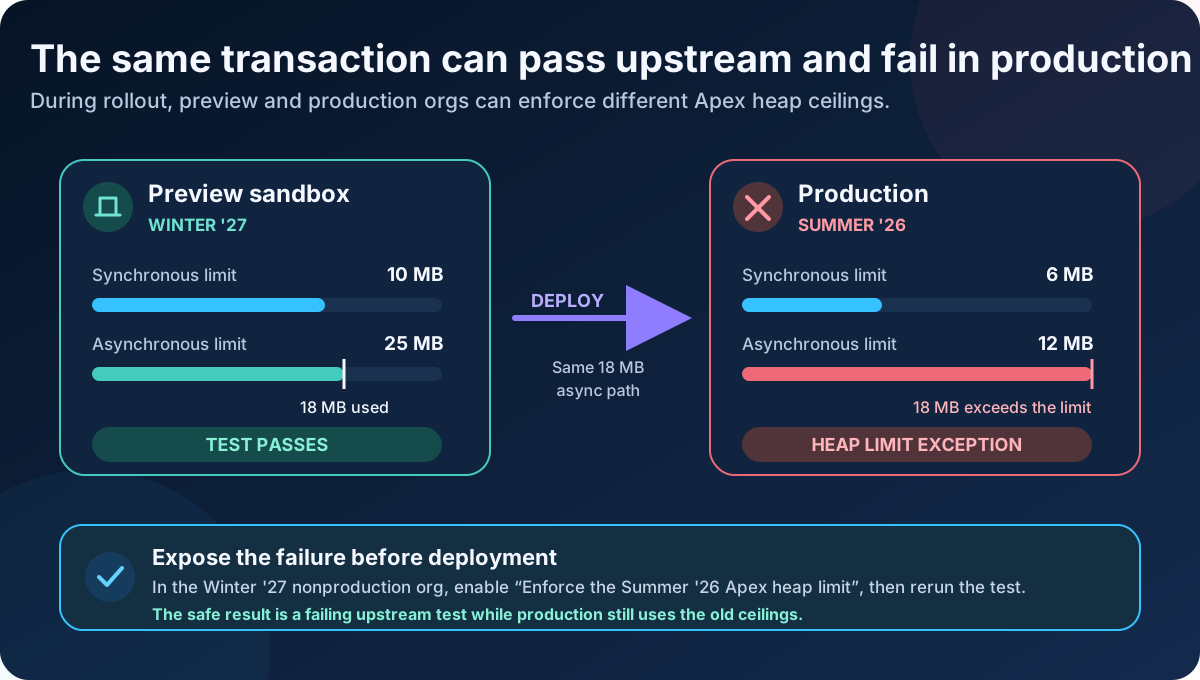
You can confirm what your org is actually running with Limits.getLimitHeapSize() rather than assuming from the release schedule.
The design advice does not change. A higher ceiling is headroom, not permission to stop thinking about memory. If a batch class needed 20 MB of heap before, it probably wanted a smaller scope size rather than a bigger allowance.
🧩 LWC Gets Two Useful Generally Available Features
Section titled “🧩 LWC Gets Two Useful Generally Available Features”Winter ‘27 makes complex template expressions generally available for Lightning Web Components. A component that renders a user interface can now use a supported subset of JavaScript expressions directly in its HTML template wherever a basic property was accepted before.
Here is the shape of it. Before complex expressions, a component might need a getter purely to pick a label:
<p>{statusLabel}</p>get statusLabel() { return this.order.isOverdue ? 'Overdue' : 'On track';}The component can now make that choice in the template and drop the getter:
<!-- orderStatus.html, on apiVersion 66.0 or later --><p>{order.isOverdue ? 'Overdue' : 'On track'}</p>The supported subset is generous: ternaries, logical operators, member access, method calls, and template literals.
The exclusions are the ones to remember, and they fail at compile time rather than surprising you at runtime. There is no this in a template expression, no assignment or ++ outside an arrow function, no new, and an expression used in an attribute must be quoted.
Two more restrictions catch people out. Arrow functions must have expression bodies, so {items.map(item => item.name)} compiles and {items.map(item => { return item.name; })} does not. Nothing asynchronous is allowed either, so await and async arrow functions stay in the class.
The version detail is easy to miss. Set the component’s apiVersion to 66.0 or later to enable the feature, not the 68.0 you might expect from a Winter ‘27 announcement. That threshold is inherited from the beta, which ran at API 66.0 from Spring ‘26, and general availability did not raise it. New Winter ‘27 components at API 68.0 qualify; existing components only need to reach 66.0, so anyone who adopted the beta changes nothing. Below 66.0 the component falls back to basic property binding, and a complex expression there is a compile error rather than a quiet no-op.
This is useful when a small piece of presentation logic is clearer beside the markup it controls. It does not make the JavaScript class obsolete. Keep a named getter or method when the calculation represents a business concept, is reused, is expensive, or deserves its own unit test. Template expressions are reevaluated when the component rerenders, so a shorter file is not automatically a faster or more maintainable component.
Third-party web components are also generally available, with no changes since the final beta. The lwc:external directive lets an LWC render a custom element as a native web component instead of rebuilding it from scratch.
You must enable Lightning Web Security first because Lightning Locker does not support the custom elements on which this feature depends. That currently rules out Experience Builder sites, which do not support third-party web components when Lightning Web Security is enabled.
Salesforce does not support the third-party components themselves, so treat the directive as an interoperability boundary, not a compatibility guarantee. Test property and event behaviour, styles, accessibility, browser support, and any third-party update process before making the component part of a critical Lightning Experience.
🔌 API Versions 31.0 Through 40.0 Are Retiring
Section titled “🔌 API Versions 31.0 Through 40.0 Are Retiring”Salesforce has announced deprecation of Platform application programming interface (API) versions 31.0 through 40.0, covering Bulk API, SOAP API, and REST API.
The timeline is generous. Deprecation lands in Summer ‘27, at which point those versions stop receiving security updates and bug fixes. Retirement follows in Summer ‘28, and calls to them start failing. Everything must be on API version 41.0 or later.
The detail worth flagging is scope. The retirement covers requests made through Bulk API, SOAP API, and versioned REST endpoints beneath both /services/data/vXX.X/ and /services/metadata/vXX.X/. That REST scope includes Connect REST API, Metadata API, Tooling API, Reports and Dashboards REST API, and Place Order REST API.
It does not retire the API versions assigned to Apex classes, triggers, Visualforce pages, flows, or versioned metadata inside managed packages. A package is affected only when it makes a SOAP, REST, or Bulk API request using version 31.0 through 40.0.
Two years sounds like plenty until you start the inventory. Begin with the free API Total Usage event log, which reports SOAP, REST, and Bulk API traffic. Download the CSV from Event Log Browser and filter API_VERSION to 40 or below. API-enabled orgs receive the previous 24 hours of data; Event Monitoring extends that retention. The log catches live traffic, but not a monthly job outside the available window, so use it alongside the connected app inventory above.
🔀 A useful shortcut, with a versioning trade-off
Section titled “🔀 A useful shortcut, with a versioning trade-off”Winter ‘27 also lets a REST client use latest instead of a numbered version in the URI, for example /services/data/latest/sobjects/Account. Salesforce routes the request to the newest REST API version supported by the org.
That is useful for discovery tools, short-lived administration scripts, and clients that deliberately follow the newest contract.
You can check what latest resolves to in a given org by calling the List Available REST API Versions resource at /services/data/, which names the version your requests are being routed to. It is worth checking per environment, because the alias follows the org rather than your code.
During a preview window a preview sandbox sits a release ahead of production, so the same latest URI reaches a higher API version there than it does in production. That is the same trap as the heap-limit setting earlier: a test that passes upstream proves nothing about the version production will use.
It is tempting to read latest as the answer to the retirement work above, because a client on latest cannot be left pinned to a version that dies. That is true, and it is still the wrong reason to choose it.
♿ Three Accessibility Updates Are Enforced This Release
Section titled “♿ Three Accessibility Updates Are Enforced This Release”Winter ‘27 is the enforcement release for a set of Lightning Experience accessibility changes that support Web Content Accessibility Guidelines (WCAG) 2.2 Resize and Reflow. In plain terms, these change how the UI behaves when a user zooms beyond 200 percent.
Salesforce enforces three updates in Winter ‘27, and they stack:
| Release update | What changes | History |
|---|---|---|
| Page headers and modal windows | Headers scroll instead of blocking content; modal content stays inside the viewport | First available in Summer ‘25; enforcement postponed from Summer ‘26 |
| Date pickers, popovers, bottom utility bars, and record headers | Common overlays and record chrome remain usable at high magnification | First available in Winter ‘26; enforcement postponed from Summer ‘26 |
| Cards, docked containers, menu lists, and panels | Header content wraps instead of being clipped | Depends on the page-header and modal update |
The To Do Lists and Lightning Dual Listboxes update belongs to the same programme but is enforced in Spring ‘27, not Winter ‘27. Salesforce says more Resize and Reflow updates will follow, so keep high-magnification testing on the release checklist.
🔒 Admin and Security Controls to Review
Section titled “🔒 Admin and Security Controls to Review”Not every important change needs a full implementation project. Several Winter ‘27 controls are small enough to miss and broad enough to affect ordinary administration, Experience Cloud, and custom user interfaces. One of them is already decided for you.
Enable Profile Filtering is a release update, and it enforces with Winter ‘27. Once it does, most users see only their own profile name. View All Profiles grants broader visibility, although several existing admin permissions also bypass the filter. It has been available since Summer ‘26, so open Release Updates in Setup before assuming it is off, because your org may have activated it already. Review support, audit, provisioning, reporting, and login-flow administrators, then assign View All Profiles only where the broader view is genuinely required. Creating or editing login flows requires it once filtering is enabled.
The rest are yours to choose.
Control unauthenticated GraphQL API access turns guest access to the GraphQL endpoint off by default in new orgs and in orgs that have not had guest GraphQL access since March 2026. Orgs with guest GraphQL use since that date keep it switched on, so current behaviour is preserved. Find out which side of that line your org sits on in API Access Controls in Setup, because where access is off, guest requests to the endpoint fail with an error.
Keep manual shares when transferring records addresses a long-standing surprise. Until now, changing a record’s owner deleted the manual shares on it, silently removing access from people who had been given it deliberately. A new org-level setting on the Sharing Settings page keeps those shares through a transfer. It is off by default to preserve the old behaviour, so this is a decision to make rather than a change to absorb.
Enable field history tracking for users is now generally available and tracks up to 20 fields on the User object, capturing old and new values, a timestamp, and who made the change, whether the update came through the user interface, bulk operations, Apex, or the API. Enable it in User Management Settings, choose the fields on the Field History Tracking Setup page, then read the history on the user’s access summary page. Track the security and lifecycle fields whose before-and-after genuinely matters, such as profile, role, manager, and active status, rather than filling all twenty slots because they are there. Salesforce does not track a role change made from the Roles Setup page; edit the user directly if the change must appear in the history. The feature applies to Enterprise, Performance, Unlimited, and Developer editions, although Salesforce notes that it is not available in all orgs.
Make inline editing in list views more flexible adds two optional User Interface Settings, both off by default and worth deciding on separately. Remove list view inline edit dependencies on page layout lets a user edit any field they have edit access to, whether or not the page layout includes it. Make inline edits in list views with multiple record types lifts the current block on inline editing when a list view mixes record types, and applies to list views rendered with LWC.
🚧 Prepare for the Spring and Summer ‘27 Enforcement Wave
Section titled “🚧 Prepare for the Spring and Summer ‘27 Enforcement Wave”Winter ‘27 also gives you the testing window for updates that enforce later. Do not activate every card blindly. Start with the affected criteria in each release note, then test the relevant code, site, or integration in a sandbox.
| Release update | Enforcement | Why it can break |
|---|---|---|
| Changed sharing recalculation behaviour | Spring ‘27 | Some sharing recalculations after large-scale group or role updates become asynchronous. Apex and Flow logic can fail if it expects share rows to exist immediately |
| Independent guest field masking | Spring ‘27 | Aura, Lightning Web Runtime (LWR), and Visualforce sites use the new Guest_PersonalInfo_EPIM field set for unauthenticated users instead of sharing the portal-user field set |
| Remove non-public fields from Aura action responses | Spring ‘27 | Components that rely on unsupported internal fields can display missing data or throw JavaScript errors |
| Update instanced URLs in API traffic | Rolling from October 2026 to March 2027 | Clients hard-coded to an incorrect instance URL must use the org’s My Domain login URL before the compatibility routing service is removed |
| Block anonymous Apex execution from managed packages | Summer ‘27 | Existing managed packages can no longer use a package session ID to execute anonymous Apex. Apex Settings includes an impact assessment for recent use |
The first row overlaps the Flow runtime, but it belongs here because the risk spans Apex, triggers, tests, and any automation that changes group membership or roles.
🧭 Agentforce, Data 360 and Other Targeted Changes
Section titled “🧭 Agentforce, Data 360 and Other Targeted Changes”The following changes are real, but their reach depends on your licences, architecture, or environment. They are worth scanning without treating each one as a universal priority.
| Change | Scope | Why it is interesting |
|---|---|---|
| Agentforce Platform enabled by default | Eligible Enterprise, Performance, Unlimited, and Developer orgs with Foundations or Agentforce 1 | New orgs are enabled at creation and existing orgs roll in from September. There is no billing change, and individual agents remain unavailable to end users until activated |
| Security Health Review | Enterprise and Unlimited with Signature Success; the Health Assessments Agent also needs Foundations | Replaces a PDF-only assessment with findings, remediation states, formal dispositions, exports, and an activity log in Setup |
| Data Detect for Data 360 | Salesforce Shield or the Data Detect add-on, plus Data 360 licences | One policy can scan up to 100 data lake objects across data spaces. Scans target text fields and consume Data Queries credits |
| Backup and Recover Next | Backup and Recover customers | Search backup history for records, download metadata as an unmanaged-package ZIP, and reload failed child objects before a restore |
| Custom CA certificates for Named Credentials | Integrations using private or internal certificate authorities | Removes the previous requirement that a server certificate chain to a Salesforce-trusted public root |
| Hyperforce and Edge Network updates | Architecture and regional planning | Hyperforce on Google Cloud is planned for North America in November 2026; self-service Edge routing is available through My Domain Setup |
| Faster Government Cloud sandboxes | All Government Cloud versions on Hyperforce | Quick Create and Quick Clone are typically two to three times faster than legacy methods, although processing time varies by org |
| Salesforce Functions retirement | Existing Salesforce Functions customers | The product is no longer available for purchase or renewal. Replace it before the current order term ends; Salesforce points customers to Heroku integration options |
Winter ‘27 also reorganises Customization, Deployment, Development, Experience Cloud, Mobile, and Salesforce CMS under one Platform section. Update saved release-review links or checklists that still follow the old structure.
💻 An Undocumented Developer Console Setting
Section titled “💻 An Undocumented Developer Console Setting”In the Winter ‘27 org I reviewed, the Web Console page in Setup includes a second control that shows or hides the legacy Developer Console. It sits beside the existing control for Salesforce Web Console (Beta).
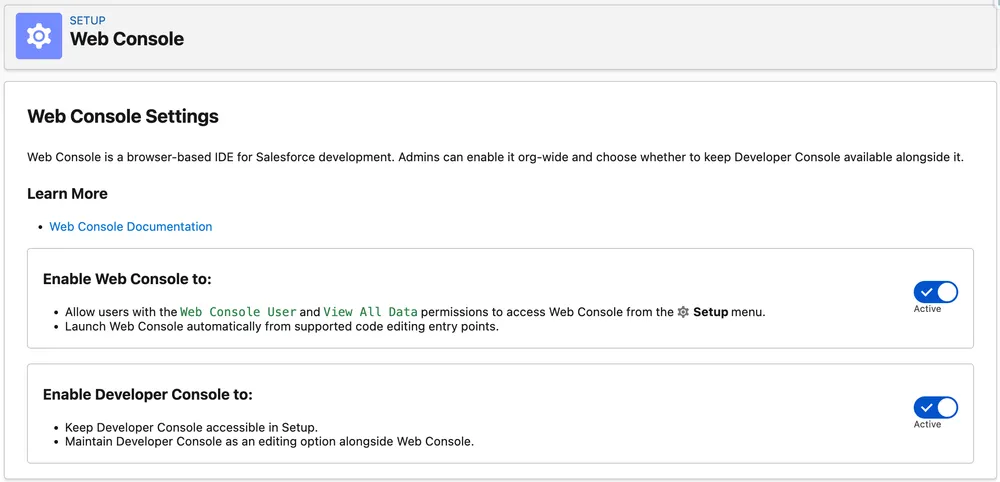
Salesforce documents API Enabled and View All Data as the permissions required to open Developer Console. Author Apex separately controls anonymous Apex execution and saving Apex changes. Hiding the menu entry is therefore a usability and tool-adoption control, not an authorisation boundary. It can make a Web Console rollout more deliberate, but permissions still determine what users can do through Salesforce CLI, APIs, or another development tool.
Web Console’s own status is harder to pin down than it should be. The Get Started guide has dropped the Beta tag from its titles, while the FAQ is still headed Frequently Asked Questions (Beta), the Salesforce Help page is still titled Web Console (Beta), and I could not find a release note announcing general availability. Salesforce’s own documentation does not agree with itself here, which is the same pattern as the LWC features earlier, where the release notes say generally available and the developer guide still says beta. I have kept the beta label above, because two of those three pages still carry it and nothing announces otherwise. Check the current pages before you describe Web Console’s status to a stakeholder.
📖 Read the Change Log Before You Commit
Section titled “📖 Read the Change Log Before You Commit”One habit is worth more than any single feature in this release: check the change log before you build an adoption plan on a release note.
The Platform notes gained guest GraphQL access controls during the week of 24 August and Apex Cursor support for Data 360 data model objects (Beta) during the week of 31 August. Agentforce Platform default enablement was also added during the week of 24 August. Those are material additions after the initial publication.
Things move in the other direction too. Two reporting betas were removed during the week of 24 August because they were not ready. The Flow notes have their own additions, updates, and removals.
Release notes on day one are a draft of what ships. The change log is where the corrections live.
🚀 Next Steps Before Your Org Upgrades
Section titled “🚀 Next Steps Before Your Org Upgrades”The right priority depends on what your org uses, but the sequence is straightforward.
- Test what enforces now. Verify SOAP
login()users that temporarily needUse Any API Auth, identify users who needView All Profiles, and test the three accessibility updates in dependency order. - Protect mixed-release deployments. If a Winter ‘27 sandbox still deploys to Summer ‘26 production, enable the old Apex heap limit in that nonproduction org until production upgrades.
- Find device-flow clients before 30 November. Confirm the actual OAuth grant rather than treating every headless client as affected, then migrate non-compliant apps to a local External Client App with a
localhostcallback. - Build one migration register. Cover Connected Apps, SOAP
login(), API versions 31.0–40.0, incorrect instance URLs, the Salesforce Connect cross-org adapter, owners, deadlines, and test evidence in the same inventory. - Use preview for the next enforcement wave. Test sharing recalculation, guest masking, Aura responses, and managed-package anonymous Apex only where the release-note impact criteria apply.
After the obligation work is under control, evaluate the useful additions: higher Apex heap limits, complex LWC template expressions, third-party web components, User field history, manual-share retention, and more flexible inline editing.
For query work, the SOQL FORMULA() article covers calculated filters, availability boundaries, and a practical evaluation plan. Read it alongside the broader developer changes before adding experiments to your release checklist.
Winter ‘27 does not reward the team that switches on the most features first. It rewards the team that knows which changes apply, proves the enforced behaviour in preview, and gives every migration an owner. Then read the change log once more in the week before your production window.
For the other half of the release, continue with Winter ‘27 Flow testing, runtime security, and builder changes.
📚 Resources
Section titled “📚 Resources”These are the three pages to reopen before approving a production change. Release status, enforcement dates, and availability can move after an article is published.