
Salesforce Experience Cloud: Customer & Partner Portals
Most organisations struggle to deliver consistent, secure digital experiences across customers, partners, and employees — especially when each audience needs different data, workflows, and branding. Salesforce Experience Cloud (formerly Community Cloud) solves this by extending your Salesforce org into branded portals, communities, and sites that share the same CRM data, security model, and automation. This guide covers what Experience Cloud is, where it fits in your stack, and how to get the most from it.
🌐 What is Salesforce Experience Cloud?
Section titled “🌐 What is Salesforce Experience Cloud?”Salesforce Experience Cloud is a digital experience platform (DXP) designed to help businesses create branded portals, websites, mobile apps, and online communities that seamlessly integrate with Salesforce CRM and other systems. It provides tools for building and managing these experiences, enabling businesses to deliver personalised content and interactions. Experience Cloud supports a wide range of use cases, from customer self-service portals to partner collaboration sites; all powered by the same data and security model as your core org.
🧱 Aura-based templates vs LWR: a key architectural choice
Section titled “🧱 Aura-based templates vs LWR: a key architectural choice”When you create an Experience Cloud site, one of your first decisions is the site model. Both options use Experience Builder for configuration, but they differ in performance, flexibility, and the skills required to maintain them.
| Choice | Prefer it when | Cost to accept |
|---|---|---|
| Aura-based template | The required template and standard components already cover the use case, or an existing site relies on Aura customisations | Older frontend model and less freedom to optimise the delivery architecture. |
| LWR site | Performance, LWC-based development and frontend control are central requirements | Stronger developer skills and careful verification that every required feature and component is supported. |
If you’re building a high-performance public-facing site, LWR is usually the better long-term choice. For internal portals or rapid MVPs where speed-to-launch matters more than fine-grained frontend control, Aura-based templates can still be more practical.
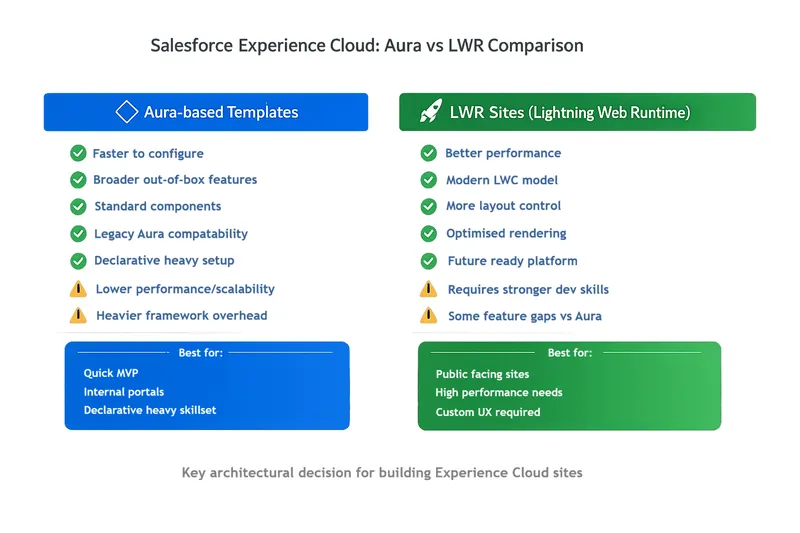
This decision is worth making early, switching site models later often means rebuilding components, reworking page layouts, and revisiting security and sharing design.
🎯 Is Experience Cloud the Right Fit?
Section titled “🎯 Is Experience Cloud the Right Fit?”The question to ask of Experience Cloud is not “can it build this site?” but “does this site need CRM data behind it?”. That answer decides whether it beats a conventional web platform.
✅ When to Use Experience Cloud
Section titled “✅ When to Use Experience Cloud”Experience Cloud is a strong fit when:
- You need authenticated portals tied directly to Salesforce data (cases, accounts, opportunities, orders).
- You require fine-grained, role-based or relationship-based access using the Salesforce sharing model.
- You want to extend existing CRM processes (service, sales, workflows) to external users.
- You need a relatively fast time-to-market using declarative tools plus targeted custom development.
🚨 When It Might Not Be the Right Fit
Section titled “🚨 When It Might Not Be the Right Fit”Experience Cloud may not be ideal when:
- You are building a purely marketing-focused website (a CMS or headless frontend is often better).
- You expect very high volumes of anonymous traffic (guest user limits, performance, and caching constraints apply).
- You need full frontend freedom with complex UX patterns better suited to a standalone SPA backed by APIs.
🧰 Key Features of Salesforce Experience Cloud
Section titled “🧰 Key Features of Salesforce Experience Cloud”An overview of Experience Cloud needs to show what the platform can do before getting into the architectural decisions. The important distinction is that Experience Cloud is not one fixed portal product: it combines site-building tools with Salesforce data, automation, identity, content, and external-user access. The exact capability available to you depends on the site template, Salesforce edition, external-user licence, and any additional products in the org.
- Experience Builder, templates, and themes let you create branded sites with point-and-click tools, preconfigured pages, themes, and reusable components. Template choice affects the pages and components available, and moving to a different template later can require substantial rework.
- Salesforce data and processes allow you to surface selected CRM and custom-object data, then extend existing processes through Flow, Apex, and integrations. Placing data on a page does not grant access to it; licences, object permissions, field access, and record sharing still control what each user can retrieve.
- Identity and external-user access support public guest journeys or authenticated experiences using patterns such as self-registration, single sign-on, and social sign-on. Authentication proves who a user is, but provisioning, account and contact relationships, licences, and sharing determine what they can access.
- Content and audience targeting help you publish content through Salesforce CMS or Knowledge and tailor supported pages or components to defined audiences. Content targeting is not a security control, and the available personalisation tools vary by template and configuration.
- Customer self-service and collaboration can bring knowledge, case management, discussions, files, and other service interactions into a customer-facing site. The available capabilities depend on the selected template and the Salesforce products and entitlements in the org.
- Partner relationship workflows give partners controlled access to leads, opportunities, deal registration, shared content, and channel processes. Partner sales features require an appropriate partner licence and a sharing model that supports role-based external users.
- Custom components and applications extend Aura or LWR sites with Lightning Web Components, Apex, Flow, and external integrations when standard components are not enough. Component compatibility, caching, performance, governor limits, and secure server-side enforcement all become part of the design.
🧭 Turning Features into Design Decisions
Section titled “🧭 Turning Features into Design Decisions”A capability list tells you what may be possible, but successful sites depend on how those capabilities fit together. The table below turns the main features into decisions you need to make before the build becomes difficult or expensive to change.
| Surface | Decision to make | Failure mode |
|---|---|---|
| Experience Builder and template | Which template supports the required pages, components and audience? | A late template change turns into a partial rebuild. |
| Components and custom code | Where are standard components enough, and where is LWC or Apex justified? | A portal that only a developer can safely update. |
| Identity | Guest, self-registration, SSO, social sign-on or just-in-time provisioning? | Duplicate users, broken account/contact associations or weak offboarding. |
| External sharing | Role-based access, Sharing Sets, sharing rules, or a combination? | The page hides data that the underlying user can still retrieve. |
| Licence model | Member-based or login-based, and which external licence supports the objects and sharing model? | The chosen licence is cheap in the forecast but cannot support the designed access pattern. |
| Content and operations | Who publishes, reviews, supports and measures the site after launch? | Stale content, abandoned registrations and no owner for access incidents. |
Experience Cloud licensing is where portal budgets are won or lost, because it constrains two things at once. Cost: licences come in member-based and login-based models, so how often your users actually visit determines which is cheaper. Capability: the licence tier gates your sharing options, since Customer Community licences do not support roles or advanced sharing, Customer Community Plus adds them, and Partner Community unlocks partner objects like leads and opportunities. Design the sharing and identity approach first, then pick the licence that supports it, not the other way around.
🔒 External user security and sharing
Section titled “🔒 External user security and sharing”Designing for external users requires careful planning of the sharing model, particularly for high-volume customer portals where role hierarchies do not scale.
- External user sharing model: Partner and customer users can be role-based or no-role (high-volume) depending on license type. Role-based users inherit access through the external role hierarchy; no-role users rely on other mechanisms such as Sharing Sets.
- Sharing Sets vs Sharing Rules: Sharing Sets grant access based on profile and account/contact relationships, which suits many customer portals. Sharing Rules extend access across the org but are often used alongside, not instead of, external sharing design.
- Guest user constraints: Guest users can browse deliberately public content without logging in, but permissions must be tightly scoped. Salesforce’s current guest site user security policy recommends private sharing defaults for non-public data, no sharing rules that expose data to the guest user, least-privilege object and field access, and explicit review of custom Apex. Treat every public endpoint as an unauthenticated attack surface.
- Identity (SSO and login flows): External users typically authenticate via SSO, social login, or self-registration. Login flows, MFA requirements, and just-in-time provisioning should be designed alongside your sharing model so users see the right data from their first session.
For high-volume customer portals, favour Sharing Sets and no-role user models over deep role hierarchies. For partner sites with smaller, account-scoped audiences, role-based external access is often more practical.
💡 Use Cases for Salesforce Experience Cloud
Section titled “💡 Use Cases for Salesforce Experience Cloud”Experience Cloud is versatile and can meet a variety of organisational needs:
- Customer Support Portals: Create self-service portals where customers can find answers, access support resources, and submit service requests thus improving satisfaction and reducing support costs.
- Partner Collaboration Sites: Develop secure sites for partners to access shared resources, collaborate on projects, and manage joint business activities.
- Internal Employee Communities: Build internal communities to facilitate communication, collaboration, and knowledge sharing among employees.
- E-commerce and Account Portals: Design buyer-facing portals that integrate with Commerce Cloud or B2B Commerce for personalised shopping and account management.
- Knowledge Hubs: Establish centralised knowledge bases where users can access articles, FAQs, and other resources independently.
🧩 Example Architecture: Customer Support Portal
Section titled “🧩 Example Architecture: Customer Support Portal”A typical Experience Cloud implementation for customer support might include:
- Experience Cloud site (LWR) for the frontend
- Service Cloud for case management and knowledge
- Sharing Sets to grant customers access to their own cases
- Apex and Flow for automation (case routing, notifications)
- SSO via an external identity provider (e.g. Azure AD, Auth0)
- Public knowledge articles with authenticated escalation to case creation
In this model, customers can search knowledge, log cases, and track progress, all backed by real-time Salesforce data and automation. It is a common pattern that ties together the sharing, identity, and cloud integration concepts covered above.
✨ Benefits of Salesforce Experience Cloud
Section titled “✨ Benefits of Salesforce Experience Cloud”- Enhanced User Engagement: Personalised and interactive digital experiences help organisations engage users more effectively, leading to increased satisfaction and loyalty.
- Faster Self-Service and Support: Self-service portals, knowledge bases, and community forums empower users to find answers, resolve issues, and initiate cases without waiting for direct support. This reduces response times and support costs.
- Real-Time Personalisation: AI-driven recommendations and dynamic content based on CRM data increase engagement and ensure users see the most relevant information.
- Seamless Collaboration: Real-time collaboration on deals, cases, and content reduces bottlenecks and streamlines business processes.
- Scalability and Security: Experience Cloud supports organisations of any size and inherits enterprise-grade security, compliance, and access control models, but license choice and sharing design determine what scale you can actually achieve in production.
- Salesforce Integration: Built on the Salesforce Platform, data consistency is maintained across CRM, sales, service, and marketing workflows.
🔗 How Experience Cloud Complements Other Salesforce Clouds
Section titled “🔗 How Experience Cloud Complements Other Salesforce Clouds”A portal is only as good as the data behind it. Experience Cloud is effectively a secure window into the rest of your stack, which is why the pairings below matter more than the site itself.
- Service Cloud: Power customer self-service with case creation, knowledge articles, and live chat — giving agents full context when users escalate to human support.
- Sales Cloud: Give partners and customers visibility into opportunities, quotes, and account activity through secure, role-based portals.
- Commerce Cloud: Embed storefronts or account portals within Experience Cloud sites for a unified buyer journey.
👥 Roles That Commonly Use Experience Cloud
Section titled “👥 Roles That Commonly Use Experience Cloud”Experience Cloud sits at the intersection of content, security, and development, so the role mix skews differently from the core clouds: someone owns the site as a product (content, moderation, engagement), admins and developers split the build between declarative Experience Builder work and custom LWC, and architects carry the identity and sharing design that external access makes unforgiving.
- Experience Cloud Managers and Community Managers own site strategy, content, moderation, and user engagement.
- Salesforce Admins often support both the core platform and Experience Cloud, configuring sites, users, permissions, sharing, and guest user access policies.
- Salesforce Developers typically build across the platform too, developing custom LWC/Aura components, Apex controllers, and integrations for advanced site functionality.
- Salesforce Architects define the end-to-end architecture across Salesforce and Experience Cloud: security models, identity/SSO patterns, integration approach, and scalability standards.
🧭 Best Practices for Maximising Salesforce Experience Cloud
Section titled “🧭 Best Practices for Maximising Salesforce Experience Cloud”- Strategic Planning and Clear Objectives: Establish clear business goals before implementation to guide platform strategy and measure success. Involve key stakeholders early and define requirements precisely.
- Leverage Personalisation: Segment audiences based on behaviour and preferences, and use AI-driven tools to deliver relevant, dynamic content. Develop user personas and tailor interactions to each segment.
- Integrate with CRM Data: Sync the platform with Salesforce CRM to unify data and customer journeys across every touchpoint. Use automation to streamline workflows and reduce manual effort.
- Monitor and Analyse Performance: Use built-in analytics to track engagement, satisfaction, and KPIs. Encourage feedback and evolve the site to meet changing business and user needs.
- Ensure Security and Compliance: Implement role-based access, encryption, and periodic security audits. Review guest-user permissions regularly — follow Salesforce’s secure guest access guidance to avoid over-exposing data.
- Invest in Training and Adoption: Train teams on site management and new features. Promote the site, measure adoption, and foster community interactions to drive long-term value.
🚀 Getting Started with Salesforce Experience Cloud
Section titled “🚀 Getting Started with Salesforce Experience Cloud”Experience Cloud clicks fastest when you stand up a real site: pick a template, wire up Sharing Sets, and log in as a test external user to feel how access actually behaves from the outside. Trailhead’s modules give you that build path step by step.
Begin with Experience Cloud Basics, then use the Customize your Experience Cloud Site trail to practise secure data sharing, site configuration, audience targeting, search, and customisation. From there, explore deeper topics such as LWR sites and custom components.
For platform updates, architecture guidance, and developer tooling, visit the Salesforce Experience Cloud Developer Center and the Experience Cloud Developer Guide.
Hands-on practice is essential. You can set up a Salesforce Developer Edition org to experiment with Experience Builder and basic site configuration, but do not infer production licensing from a learning org. Authenticated external users require an appropriate Experience Cloud licence, and templates or capabilities can have additional commercial requirements. Use Salesforce’s Experience Cloud user licence comparison when choosing between high-volume, role-based, member-based and login-based models.
🏁 Conclusion
Section titled “🏁 Conclusion”Experience Cloud earns its place when the external journey needs Salesforce data and process close behind the page. The decisive work is not dragging components into Experience Builder; it is choosing the site model, identity pattern, licence and sharing design that remain safe at the expected scale. Prototype with a realistic external user, test access outside the UI, and price the licence model against actual login behaviour before committing to production.
❓ Frequently Asked Questions
Section titled “❓ Frequently Asked Questions”🌐 What is Salesforce Experience Cloud used for?
Section titled “🌐 What is Salesforce Experience Cloud used for?”It is used to build customer portals, partner portals, and employee communities that connect directly to Salesforce data and processes.
🔄 Is Experience Cloud the same as Community Cloud?
Section titled “🔄 Is Experience Cloud the same as Community Cloud?”Yes. Experience Cloud is the renamed and expanded version of Salesforce Community Cloud.
🔑 What licenses are required for Experience Cloud?
Section titled “🔑 What licenses are required for Experience Cloud?”Common licenses include Customer Community, Customer Community Plus, and Partner Community, each with different capabilities and sharing models. See Experience Cloud license types in Salesforce Help for the full list.