
SOQL: How to use TYPEOF

Across this series you have built up the everyday SOQL toolkit: filtering, sorting, relationships, aggregates, and date logic. The previous article on date functions closed out the time-based patterns. This final article in the core series tackles a more specialised case you will hit the moment you work with polymorphic relationship fields like Task.WhatId.
A polymorphic relationship is a single lookup that can point to different object types from one row to the next, and it needs its own SOQL clause to query cleanly. This article explains what TYPEOF is, when to reach for it, and how it compares to the alternatives, with a worked Apex example you can adapt.
🧩 What is TYPEOF in SOQL?
Section titled “🧩 What is TYPEOF in SOQL?”TYPEOF is a SOQL clause for querying polymorphic relationships, where a single reference can point to different object types at runtime.
A quick way to understand this is to compare it with a standard lookup field. A normal lookup points to one fixed object type, while a polymorphic lookup can point to multiple object types and vary row by row.
For example, one Task.WhatId might point to an Opportunity, while another points to a Case. That flexibility is useful, but it creates a query challenge: SOQL cannot always know in advance which type-specific fields are safe to traverse with dot notation.
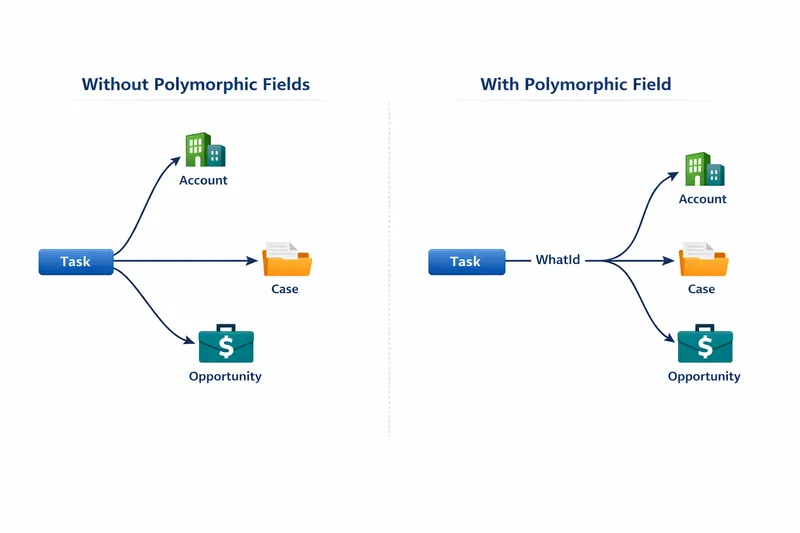
Common polymorphic examples include:
WhatIdandWhoIdonTaskParentIdon Contact Point objects likeContactPointAddressOwnerIdon records that can be owned by either aUseror aQueue(for example,Case)
Without TYPEOF, dot notation is usually limited to a small safe subset such as Id, Name, and Type. If you need fields that exist only on certain parent object types, TYPEOF gives you a clear, explicit way to query them.
🕒 When should you use TYPEOF?
Section titled “🕒 When should you use TYPEOF?”Use TYPEOF when all of the following are true:
- You are querying a polymorphic lookup field.
- You need fields that differ by parent object type.
- You want one query instead of splitting the logic into multiple queries.
Syntax overview:
TYPEOF: The polymorphic field (for example,Parent)WHEN: The object-type branch (for example,Account)THEN: Fields to return for that object typeELSE(optional): Fallback fields when noWHENbranch matchesEND: Closes the expression
Example:
SELECT Id, Name, TYPEOF Parent WHEN Account THEN Id, Name, Description WHEN Individual THEN Id ELSE Id ENDFROM ContactPointAddress🔧 Step-by-step real-world example
Section titled “🔧 Step-by-step real-world example”Imagine a customer data model where ContactPointAddress.ParentId can point to either an Account or an Individual. You need one dataset for a service process, but the useful fields differ by parent type.
-
Start with a query that includes one
TYPEOFbranch per parent type:SELECT Id, Name,TYPEOF ParentWHEN Account THEN Id, Name, DescriptionWHEN Individual THEN IdENDFROM ContactPointAddressLIMIT 10Run it in Developer Console. Rows whose parent is an Individual return
Idalone, and theDescriptioncolumn stays blank for them. That blank is the branch working, not a data gap. -
In Apex, check the runtime type before using type-specific fields:
List<ContactPointAddress> addresses = [SELECT Id, Name,TYPEOF ParentWHEN Account THEN Id, Name, DescriptionWHEN Individual THEN IdENDFROM ContactPointAddressLIMIT 10];for (ContactPointAddress address : addresses) {if (address.Parent instanceof Account) {Account acc = (Account) address.Parent;System.debug('Account Description: ' + acc.Description);}}The debug log should show one line per Account-parented row and nothing for the rest. If it throws instead, the
instanceofguard has been skipped somewhere. -
Keep each branch field list tight so the query stays predictable and easier to maintain.
🆚 TYPEOF vs alternatives
Section titled “🆚 TYPEOF vs alternatives”| Approach | Best when | Pros | Trade-offs |
|---|---|---|---|
| Dot notation only | You only need common fields (Id, Name, Type) |
Simple and readable | Cannot access type-specific fields reliably |
TYPEOF |
One polymorphic field, different fields by object type | Single query, explicit per-type field selection | More complex query shape; tool output can vary |
| Multiple queries by type | You need heavily different logic by type | Clear separation and custom logic per type | More query overhead and orchestration in Apex |
🚧 Common pitfalls, limits, and gotchas
Section titled “🚧 Common pitfalls, limits, and gotchas”- Forgetting runtime checks in Apex: even with
TYPEOF, still guard withinstanceofbefore accessing fields. - Missing fallback handling: consider
ELSEso unexpected types do not break assumptions. - Over-fetching fields: keep
THENfield lists minimal for better performance and readability. - Tooling confusion: some query tools display polymorphic results differently, so validate with Apex/debug logs when in doubt.
- Dot-notation assumptions: do not assume type-specific fields are available without
TYPEOF.
Performance note: polymorphic queries can still be expensive at scale, so combine good filtering and selectivity practices with careful field selection.
🚫 Where TYPEOF isn’t allowed
Section titled “🚫 Where TYPEOF isn’t allowed”TYPEOF only works in the SELECT clause, and several contexts do not support it at all. Knowing these upfront saves you designing around a query shape that will not compile:
- Not in
WHERE,ORDER BY,GROUP BY, orHAVING. To filter by parent type, use the polymorphic field’sTypequalifier in theWHEREclause instead, for exampleWHERE What.Type = 'Account'. - Not in queries that don’t return objects, such as
COUNT()and other aggregate queries. - Not supported in Bulk API query jobs or Streaming API PushTopic queries.
- Can’t be nested inside another
TYPEOF, and can’t be combined with functions likeFORMAT()in the sameSELECT.
See the official TYPEOF reference for the complete list.
🔁 Can I always replace multiple queries with TYPEOF?
Section titled “🔁 Can I always replace multiple queries with TYPEOF?”Not always. TYPEOF is great when you need one result set with type-specific fields. If each type requires very different business logic, separate queries can still be cleaner.
🧪 Why does my query editor output look incomplete?
Section titled “🧪 Why does my query editor output look incomplete?”Some tools do not render TYPEOF branches clearly in tabular output. Validate behaviour in Apex, debug logs, or tools that fully support polymorphic result rendering.
🧠 Do I still need instanceof in Apex after using TYPEOF?
Section titled “🧠 Do I still need instanceof in Apex after using TYPEOF?”Yes. TYPEOF controls what is queried, but your Apex still needs safe runtime checks before you use type-specific fields.
🧭 Is TYPEOF only for Task WhatId and WhoId?
Section titled “🧭 Is TYPEOF only for Task WhatId and WhoId?”No. It works for supported polymorphic references in Salesforce, including other polymorphic parent relationships.
✅ Conclusion
Section titled “✅ Conclusion”TYPEOF solves a specific problem: one polymorphic lookup, multiple parent types, and different fields per type in a single SOQL query. Use it when dot notation is not enough, keep each WHEN branch lean, handle unexpected types with ELSE, and pair the query with instanceof checks in Apex before you touch type-specific data.
For further reading, see the official Salesforce TYPEOF documentation. To go deeper, continue with Mastering SOQL in Salesforce: Advanced Techniques and Best Practices, or return to the Discovering SOQL: The Essential Guide for Beginners.