
SOQL and Salesforce Lightning

Lightning makes it easy to get a record on screen quickly. Where things get complicated is when that record view becomes a filtered list of open cases, a metrics panel rolling up pipeline by region, or a cross-object search that needs results shaped for a specific UI. Record-based APIs like getRecord handle the simple cases well, but they are not query engines. When a component needs selective filtering, aggregation, or joined data, those patterns break down quickly.
In Lightning development, using SOQL in Apex fills that gap. It lets you write precise queries that return exactly the rows and fields a component needs, apply WHERE conditions across related objects, and aggregate metrics before results reach the component. I reach for this pattern whenever a Lightning component’s data requirements go beyond what a single record lookup can express cleanly, especially when building filtered case lists, pipeline dashboards, or custom search interfaces.
In this guide, you will learn when to use record-based access versus Apex-backed SOQL, how to wire query results to a Lightning Web Component efficiently, how to stay within governor limits under realistic load, and how to enforce field-level security correctly in current Salesforce API versions. If you want a quick primer before this Lightning-focused guide, start with integrating SOQL with Apex.
⚡ Understanding SOQL in Salesforce Lightning
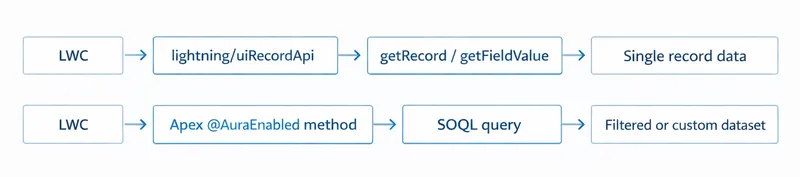
Section titled “⚡ Understanding SOQL in Salesforce Lightning”For record-centric access in LWC, use methods like getRecord and getFieldValue from lightning/uiRecordApi. These are record-based data access patterns, not query engines. When you need query-based retrieval logic (cross-object filters, selective conditions, aggregation, or custom row shaping), run SOQL in Apex and return the results to the component. Because LWC runs client-side and has no direct access to the database layer, SOQL must execute in Apex, which acts as the enforced server-side boundary for data access and security.
getRecord / uiRecordApi |
Apex + SOQL | |
|---|---|---|
| Scope | Single record by Id | Multiple records, filtered sets |
| Filtering | Not supported | Full WHERE, LIMIT, ORDER BY |
| Aggregation | Not supported | COUNT, SUM, AVG, GROUP BY |
| Security enforcement | Platform-managed sharing, object access, and FLS | Apex-owned; declare sharing and database access mode explicitly |
| Cross-object queries | Parent field traversal only | Full relationship queries |
| Best for | Record detail views, single-record forms | Lists, dashboards, search interfaces, custom data shapes |
🧱 Using SOQL in Lightning Web Components
Section titled “🧱 Using SOQL in Lightning Web Components”To use SOQL with LWCs, you need to create an Apex controller that executes the query and exposes the data to the component. Here’s a basic example:
Apex Controller:
public with sharing class AccountController { @AuraEnabled(cacheable=true) public static List<Account> getAccounts(String industry) { return [ SELECT Id, Name, Industry FROM Account WHERE Industry = :industry WITH USER_MODE ]; }}LWC JavaScript:
import { LightningElement, wire } from 'lwc';import getAccounts from '@salesforce/apex/AccountController.getAccounts';
export default class AccountList extends LightningElement {    industry = 'Technology';    @wire(getAccounts, { industry: '$industry' }) accounts;}
The getAccounts method accepts a typed String parameter, which is passed into the query as a bind variable using :industry. This keeps the query safe from injection and makes the method reusable across different filter values. In the LWC, the $industry prefix on the wire property tells the wire service to re-run the Apex call reactively whenever industry changes.
🤝 Apex as a Data Contract
Section titled “🤝 Apex as a Data Contract”When you design an @AuraEnabled method for an LWC, you’re not just writing a query, you’re defining a contract between the server and the UI. Treating it as such from the start makes components more reliable and the Apex layer easier to maintain and security review.
A well-defined data contract has four characteristics:
- Typed inputs: Accept explicit, typed parameters rather than dynamic query fragments or untyped inputs. This makes the method self-documenting and keeps untrusted values in bind variables rather than in the SOQL structure.
- Intentional output shape: Return only the fields and records the component needs. Returning a raw
List<sObject>works for simple cases, but for more complex components, a wrapper class or data transfer object (DTO) makes the contract explicit and prevents accidentally surfacing fields the UI never uses. - Owned security enforcement: The Apex method is the security boundary. Use
with sharingon the class,WITH USER_MODEin the query, orSecurity.stripInaccessible()where needed. Never assume the platform or the component will handle it. - Stable signature: The component depends on the method’s return structure. Treat signature changes like breaking API changes. Adding fields silently can expose sensitive data; removing or renaming them breaks the component.
I use this framing when reviewing LWC data access in production orgs, especially in Health Cloud implementations where security and audit requirements are strict. Components that treat their Apex methods as contracts tend to be significantly easier to security review, refactor, and hand over to other developers, and they age much better as requirements change.
🚀 Performance Considerations
Section titled “🚀 Performance Considerations”- Governor Limits: Design with concrete limits in mind. A synchronous Apex transaction can issue up to 100 SOQL queries and retrieve up to 50,000 total queried rows. Most asynchronous transactions can issue up to 200 queries and retrieve the same 50,000 rows; scheduled Apex uses the synchronous limits. For larger workloads, a Batch Apex job using
Database.QueryLocatorcan return up to 50 million records, and per-transaction limits reset for eachexecutescope (Execution Governors and Limits). - Caching: The
cacheable=trueattribute can be used in the@AuraEnabledannotation to enable client-side caching, reducing server calls and improving performance. - Progressive Retrieval: For large datasets in interactive components, prefer pagination, selective filtering, and lazy loading so each request stays small and responsive. Use imperative Apex calls when request timing must be controlled by user actions.
- Avoid Over-Fetching: Only SELECT the fields the component actually renders. Returning full sObjects when the component needs a few fields is one of the most common LWC performance issues I see in orgs, especially in components that surface dozens or hundreds of records. It increases payload size, slows wire adapter rendering, and makes the Apex method harder to reason about. If the field list diverges significantly from a standard sObject, a lightweight wrapper class is usually the cleaner solution.
For deeper tuning patterns, see SOQL performance optimisation techniques.
🔐 Security Considerations
Section titled “🔐 Security Considerations”- Complete response: For a fixed user-facing field set, declare
with sharingon the controller and query withWITH USER_MODE. Map any permission failure to a stable UI error rather than exposing permission details. - Partial response: Use
Security.stripInaccessible()only when the component is designed to work without defined optional fields. Return only the sanitised records and make the partial-response behaviour part of the component contract. - Deliberate elevation: If a controller needs system-mode data, keep the elevated operation narrow and prove that neither raw fields nor out-of-scope rows can reach the browser.
For API 67.0 defaults, the full class/query interaction matrix, restriction and scoping rules, and security-testing guidance, use SOQL security guidance as the canonical reference.
🧭 Best Practices for SOQL in Lightning
Section titled “🧭 Best Practices for SOQL in Lightning”- Optimise Queries: Use indexed fields in the WHERE clause to improve query performance.
- Use Bind Variables: Enhance security and performance by using bind variables in your queries.
- Cache Only User-Safe Data: Treat
@AuraEnabled(cacheable=true)as a performance feature, not a security control. Only cache data that has already been filtered for the current user and business context. - Error Handling: Implement robust error handling to manage exceptions and provide meaningful feedback to users.
🧩 Common Use Cases
Section titled “🧩 Common Use Cases”- Dynamic Data Display: Use SOQL to fetch and display data dynamically in Lightning components, such as lists, tables, and charts.
- Interactive Dashboards: Build interactive dashboards that update in real-time based on user input or data changes.
- Custom Search Interfaces: Create custom search interfaces that allow users to filter and search data using dynamic SOQL queries. For multi-object text search requirements, pair this with SOSL basics.
✅ Conclusion
Section titled “✅ Conclusion”The most reliable LWC implementations treat the Apex layer as a genuine data contract: the component asks for exactly what it needs, the controller enforces access correctly, and neither side assumes the other will catch edge cases. I’ve found this contract-based approach is what keeps components responsive under realistic load while still respecting governor limits and security boundaries.
Once you have the core LWC pattern solid, the same principles carry directly into API-driven workflows. The main difference is that the caller changes from a Lightning component to an external system or integration layer, and I’ve seen poorly scoped queries become much harder to isolate and fix once they’re off-platform.
The next guide, SOQL API integration, picks up directly from here. It covers how to structure SOQL queries safely when the data consumer is an external system rather than a UI component, including how the shift from an on-platform session to an off-platform integration layer changes both query scope and permission enforcement.