
Discovering SOQL: The Essential Guide for Beginners
When I first transitioned into a Salesforce Developer role, I spent entirely too much time wrestling with data. It wasn’t until I truly grasped SOQL (Salesforce Object Query Language) that I felt like I had unlocked the platform. Suddenly, I could pull precise, complex datasets in seconds. Mastering SOQL transformed how I worked, saving me hours of frustration and allowing me to build much more robust solutions.
This guide is designed to accelerate your journey from running basic queries to retrieving data like a seasoned professional so you don’t face the same struggles I did. In this essential guide, we will cover:
- The Fundamentals: The core syntax (
SELECT,FROM,WHERE) you need to construct your first queries. - Practical Applications: How both Admins and Developers use SOQL in their daily workflows to solve real business problems.
- Your Learning Path: A structured roadmap pointing you to the right next topics (like relationship queries and governor limits) as your skills grow.
🔍 What is SOQL?
Section titled “🔍 What is SOQL?”At its core, SOQL is the language you use to retrieve data directly from your Salesforce org’s database. You simply define which fields you want, which object they come from, and the conditions for which records should be returned.
A simple SOQL query looks like this:
SELECT Name, Amount, CloseDate, Owner.Name, Account.NameFROM OpportunityWHERE IsClosed = false AND Amount >= 10000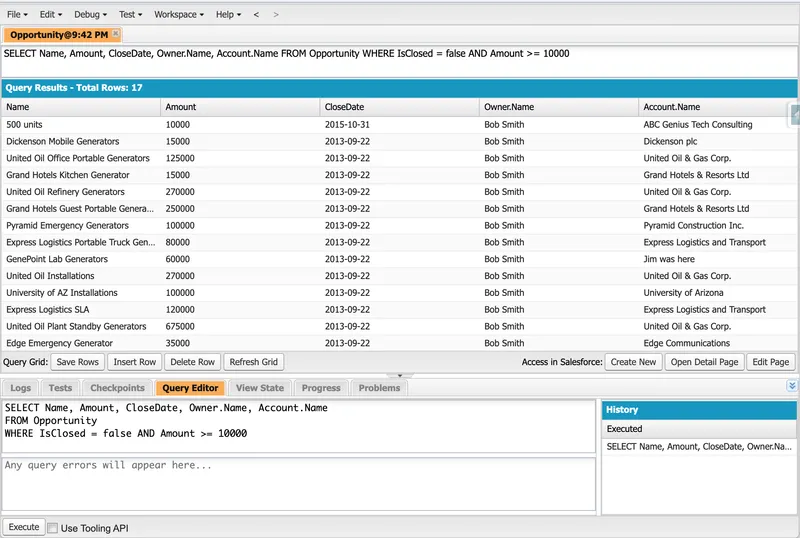
This query returns open opportunities worth at least 10,000, including owner and account context in one result set. Whether you are an admin checking data quality, a developer building Apex and Lightning features, or a consultant preparing for certification, SOQL is a foundational skill you will use every single day.
👥 Who This Series Is For
Section titled “👥 Who This Series Is For”This series is for readers who want to:
- Learn SOQL from the ground up with practical examples.
- Understand when to use filters, sorting, relationships, and aggregates.
- Build confidence writing queries in Developer Console, Apex, and API workflows.
- Develop query habits that scale into more advanced Salesforce implementations.
No prior SOQL experience is required.
🎯 What You Will Learn
Section titled “🎯 What You Will Learn”By the end of this introduction series, you should be able to:
- Write valid SOQL queries with
SELECT,FROM, andWHERE. - Filter results with operators and logical conditions.
- Sort and limit records for cleaner, faster results.
- Query parent-child relationships confidently.
- Use aggregate functions to summarise data.
- Recognise when to move to advanced SOQL patterns.
🧭 Suggested Learning Path
Section titled “🧭 Suggested Learning Path”Use this order to build your understanding step by step:
- Learn core query structure and syntax.
- Add filtering and advanced filter logic.
- Practice ordering, limiting, and relationship queries.
- Finish with aggregate, date, and
TYPEOFuse cases. - Move to the advanced SOQL series when you are ready to optimise for scale and security.
🚀 SOQL Series Index
Section titled “🚀 SOQL Series Index”Use this index as a practical roadmap: start with the foundations, then move through filtering and control, and finish with relationship and analysis topics. If you follow the sections in order, each guide builds naturally on the one before it.
🧱 Foundations
Section titled “🧱 Foundations”Build your baseline first. These guides cover the core syntax and query structure patterns you will reuse everywhere else in the series.
🚦 Filtering and Query Control
Section titled “🚦 Filtering and Query Control”Focus on precision and control. This section helps you filter, narrow, and shape results so your queries return exactly what the use case needs.

3. Filtering with the WHERE Clause
Use operators and conditions to narrow query results precisely.
4. Advanced Filtering Techniques
Combine multiple conditions and patterns to handle realistic business query scenarios.
5. Ordering and Limiting
Sort results and cap record counts for predictable, useful outputs.🔗 Relationships and Analysis
Section titled “🔗 Relationships and Analysis”Move from basic retrieval to richer insight. These guides show how to traverse related objects and work with aggregates, date logic, and polymorphic relationships.
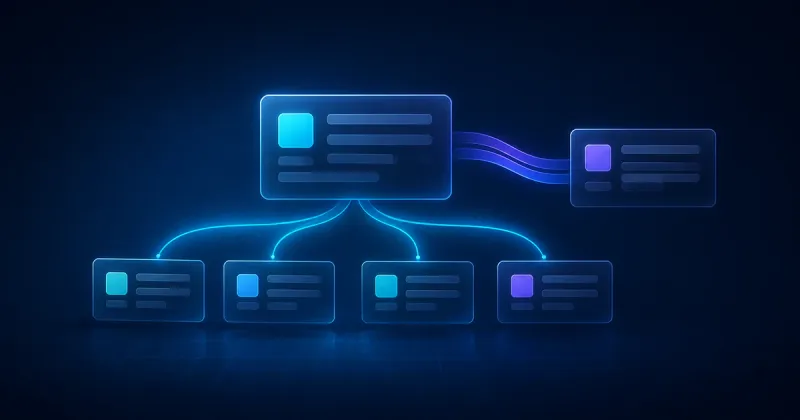
6. Querying Parent and Child Objects
Traverse object relationships to retrieve connected Salesforce data in one query.
7. Using Aggregate Functions
Summarise records with COUNT, SUM, AVG, MIN, and MAX for reporting style insights.
8. A Guide to Date Literals
Use relative date keywords to query time based data quickly and accurately.
9. A Guide to Date Functions
Apply date functions for more precise filtering logic in temporal queries.
10. Using TYPEOF on SOQL Queries
Handle polymorphic relationships with cleaner, more expressive query results.📈 Ready for the next level?
Section titled “📈 Ready for the next level?”Once you are comfortable with SOQL fundamentals, continue to advanced patterns for optimisation, security, dynamic queries, and large org performance.
Mastering SOQL in Salesforce: Advanced Techniques and Best PracticesMove from beginner queries to enterprise grade SOQL patterns.
🔎 When to use SOSL instead of SOQL
Section titled “🔎 When to use SOSL instead of SOQL”If you need broad text search across multiple objects rather than structured relational queries, SOSL may be the better fit.
Getting Started with SOSLLearn when Salesforce Object Search Language is a better choice than SOQL.
✅ Conclusion
Section titled “✅ Conclusion”This page is the roadmap, not a substitute for running the queries. Work through the series with a development org, sandbox, or scratch org beside you and keep one question in mind for every example: does this return the records I intended, for the users who will run it, at the volume the production org contains? That habit is what turns remembered syntax into reliable SOQL.
Once the core examples feel natural, continue to the advanced SOQL series for selectivity, security, Apex, and API design decisions. Use SOSL instead when the requirement is broad text search and you do not know which object or field contains the term.
📚 Resources
Section titled “📚 Resources”If you want official references while you learn, use these alongside the JamForce guides:
SOQL and SOSL reference (Salesforce Developer Docs)Comprehensive syntax and feature reference.
Write SOQL queries (Trailhead)Hands-on beginner practice with guided exercises.
Object reference and relationships (Salesforce Developer Docs)Field and relationship definitions across standard objects.
Apex SOQL basics (Salesforce Developer Docs)Query behaviour and usage from Apex.