
SOQL: A Guide to Date Literals

In Salesforce, filtering by date is a daily task. Date literals in SOQL let you match common ranges (last month, this quarter, the last 90 days) without hard-coding calendar values. After summarising data with aggregate functions, date literals are the natural next step for time-based WHERE filters that stay correct as the clock moves.
📅 What are Date Literals?
Section titled “📅 What are Date Literals?”Date literals are predefined keywords you use in WHERE clauses on date and date/time fields. Salesforce resolves them relative to the current date (and your org’s fiscal calendar settings where applicable), so the same query returns the right window tomorrow as it does today.
Syntax is typically an equality filter:
WHERE CreatedDate = LAST_MONTHYou can also combine date literals with AND, OR, and other filters for more precise queries.
📆 Fixed Date Literals
Section titled “📆 Fixed Date Literals”Fixed literals name a single calendar period: a day, week, month, quarter, or year. Each range starts at midnight and has a defined end.
🌅 Days and Weeks
Section titled “🌅 Days and Weeks”- YESTERDAY: Starts at 12:00 AM on the day before the current day and continues for 24 hours.
- TODAY: Starts at 12:00 AM on the current day and continues for 24 hours.
- TOMORROW: Starts at 12:00 AM on the day after the current day and continues for 24 hours.
- LAST_WEEK: Starts at 12:00 AM on the first day of the previous week and continues for 7 days.
- THIS_WEEK: Starts at 12:00 AM on the first day of the current week and continues for 7 days.
- NEXT_WEEK: Starts at 12:00 AM on the first day of the next week and continues for 7 days.
SELECT Id, Subject, ActivityDate, Owner.NameFROM TaskWHERE ActivityDate = THIS_WEEKThis query returns Tasks due at any point in the current week. Swap the literal for TODAY to narrow it to a single day, or NEXT_WEEK to look ahead, without touching the rest of the query.
Your locale determines the first day of the week for these literals (Sunday for US English, Monday for New Zealand English). If you have no personal locale set, Salesforce uses the org locale.

📋 Months and Rolling Windows
Section titled “📋 Months and Rolling Windows”- LAST_MONTH: Starts at 12:00 AM on the first day of the previous month and continues until the end of the last day of that month.
- THIS_MONTH: Starts at 12:00 AM on the first day of the current month and continues until the end of the last day of that month.
- NEXT_MONTH: Starts at 12:00 AM on the first day of the next month and continues until the end of the last day of that month.
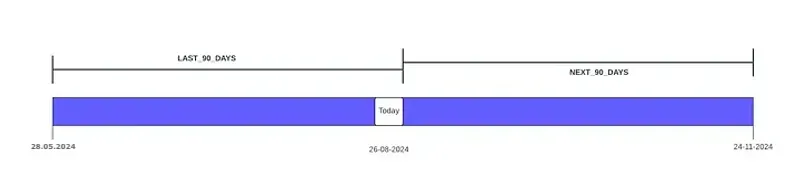
- LAST_90_DAYS: Starts at 12:00 AM 90 days before the current day and continues up to the current moment. The range includes today.
- NEXT_90_DAYS: Starts at 12:00 AM on the day after the current day and continues for the next 90 days. The range does not include today.
SELECT Id, Name, Status, CreatedDateFROM LeadWHERE CreatedDate = LAST_90_DAYSAND Status = 'Open - Not Contacted'This query returns Leads created in the rolling 90-day window up to right now, including any created today, whose status is Open - Not Contacted. Lead Status values are configurable, so use the equivalent value from your org. LAST_MONTH in the same slot would answer a different question: the whole of the previous calendar month, and nothing from this one.
📊 Quarters and Fiscal Quarters
Section titled “📊 Quarters and Fiscal Quarters”- THIS_QUARTER: Starts at 12:00 AM on the first day of the current quarter and continues until the last day of that quarter.
- LAST_QUARTER: Starts at 12:00 AM on the first day of the previous quarter and continues until the last day of that quarter.
- NEXT_QUARTER: Starts at 12:00 AM on the first day of the next quarter and continues until the last day of that quarter.
- THIS_FISCAL_QUARTER: Starts at 12:00 AM on the first day of the current fiscal quarter and continues until the last day of that quarter.
- LAST_FISCAL_QUARTER: Starts at 12:00 AM on the first day of the previous fiscal quarter and continues until the last day of that quarter.
- NEXT_FISCAL_QUARTER: Starts at 12:00 AM on the first day of the next fiscal quarter and continues until the last day of that quarter.
SELECT Id, Name, Amount, StageName, CloseDateFROM OpportunityWHERE CloseDate = THIS_FISCAL_QUARTERAND StageName = 'Closed Won'This query returns won Opportunities closing in the current fiscal quarter. Change the literal to THIS_QUARTER and the same query reports on calendar quarters instead. If your org’s fiscal year does not start in January, these two return different rows, so pick the one the business actually reports on.
🏦 Calendar and Fiscal Years
Section titled “🏦 Calendar and Fiscal Years”- THIS_YEAR: Starts at 12:00 AM on the first day of the current year and continues until the last day of that year.
- LAST_YEAR: Starts at 12:00 AM on the first day of the previous year and continues until the last day of that year.
- NEXT_YEAR: Starts at 12:00 AM on the first day of the next year and continues until the last day of that year.
- THIS_FISCAL_YEAR: Starts at 12:00 AM on the first day of the current fiscal year and continues until the last day of that fiscal year.
- LAST_FISCAL_YEAR: Starts at 12:00 AM on the first day of the previous fiscal year and continues until the last day of that fiscal year.
- NEXT_FISCAL_YEAR: Starts at 12:00 AM on the first day of the next fiscal year and continues until the last day of that fiscal year.
🔢 Dynamic Date Literals
Section titled “🔢 Dynamic Date Literals”Dynamic literals take a positive integer n to define a range relative to today. Use them when fixed periods like LAST_MONTH are too broad or too narrow.
SELECT Id, CaseNumber, Subject, Status, CreatedDateFROM CaseWHERE CreatedDate = LAST_N_DAYS:7AND Status != 'Closed'The :n suffix supplies the count, with no space around the colon. This query returns open Cases created from midnight seven days ago through the current moment. This is seven complete prior days plus the elapsed portion of today. That spans eight calendar dates, which is a common source of confusion, so check the section below for which literals include the current period.
- LAST_N_DAYS:n: Starts at 12:00 AM
ndays before the current day and continues up to the current moment. The range includes today. For example,LAST_N_DAYS:10covers the last 10 days and today, 11 days of data in total. - NEXT_N_DAYS:n: Starts at 12:00 AM on the day after the current day and continues for the next
ndays. The range does not include today. - N_DAYS_AGO:n: The single day that was
ndays before today (24 hours starting at 12:00 AM that day). Does not include today. - LAST_N_WEEKS:n: Starts at 12:00 AM on the first day of the week
nweeks ago and continues through the end of the week before the current week. Does not include the current week. - NEXT_N_WEEKS:n: Starts at 12:00 AM on the first day of the week after the current week and continues for the next
nweeks. Does not include the current week. - N_WEEKS_AGO:n: The week that was
nweeks before the current week (7 days from the first day of that week).

- LAST_N_MONTHS:n: From the first day of the month
nmonths ago through the end of the month before the current month. Does not include the current month. - NEXT_N_MONTHS:n: From the first day of the month after the current month through the end of the
n-month span ahead. Does not include the current month. - N_MONTHS_AGO:n: The full calendar month that was
nmonths before the current month. - NEXT_N_QUARTERS:n: From the first day of the quarter after the current quarter through the end of the
n-quarter span ahead. Does not include the current quarter. - LAST_N_QUARTERS:n: From the first day of the quarter
nquarters ago through the end of the quarter before the current quarter. Does not include the current quarter. - N_QUARTERS_AGO:n: The full quarter that was
nquarters before the current quarter. - NEXT_N_FISCAL_QUARTERS:n: From the first day of the fiscal quarter after the current fiscal quarter through the end of the
nfiscal-quarter span ahead. Does not include the current fiscal quarter. - LAST_N_FISCAL_QUARTERS:n: From the first day of the fiscal quarter
nfiscal quarters ago through the end of the fiscal quarter before the current one. Does not include the current fiscal quarter. - N_FISCAL_QUARTERS_AGO:n: The full fiscal quarter that was
nfiscal quarters before the current fiscal quarter. - LAST_N_YEARS:n: Ends on 31 December of the year before the current year. The documented start is 12:00 AM on 1 January
n + 1years ago, which makesLAST_N_YEARS:1span the two previous calendar years (see the caution below). Does not include the current year. - NEXT_N_YEARS:n: From 1 January of the year after the current year through the end of the
n-year span ahead. Does not include the current year. - N_YEARS_AGO:n: The full calendar year that was
nyears before the current year. - NEXT_N_FISCAL_YEARS:n: From the first day of the fiscal year after the current fiscal year through the end of the
nfiscal-year span ahead. Does not include the current fiscal year. - LAST_N_FISCAL_YEARS:n: From the first day of the fiscal year
nfiscal years ago through the end of the fiscal year before the current one. Does not include the current fiscal year. - N_FISCAL_YEARS_AGO:n: The full fiscal year that was
nfiscal years before the current fiscal year.
💻 SOQL Query Examples
Section titled “💻 SOQL Query Examples”📥 Accounts created last month
Section titled “📥 Accounts created last month”SELECT Id, Name, CreatedDate FROM Account WHERE CreatedDate = LAST_MONTHReturns all Account records created in the previous calendar month (for example, in August this returns July creations).
📝 Accounts modified in the last 10 days
Section titled “📝 Accounts modified in the last 10 days”SELECT Id, Name, LastModifiedDate FROM Account WHERE LastModifiedDate = LAST_N_DAYS:10Returns Accounts modified in the rolling window covering the last 10 days and today, since LAST_N_DAYS includes the current day.
🎯 Opportunities closing next week
Section titled “🎯 Opportunities closing next week”SELECT Id, Name, CloseDate FROM Opportunity WHERE CloseDate = NEXT_N_WEEKS:1Returns Opportunities with a close date in the upcoming week (from the first day of next week through the end of that week, with your locale determining which day a week starts on).
📌 Month to date
Section titled “📌 Month to date”There is no month-to-date literal, so build one by capping THIS_MONTH at today:
SELECT Id, Name, Amount, CloseDateFROM OpportunityWHERE CloseDate = THIS_MONTHAND CloseDate <= TODAYTHIS_MONTH on its own covers the entire calendar month, including days that have not happened yet, which matters on any field that can hold future dates such as CloseDate. The second predicate closes the window at the end of today. This works because relational operators against a date literal compare with the edge of that literal’s range: <= TODAY means “up to the end of today”, while < TODAY would stop at midnight this morning and drop today’s records entirely. The same pattern with THIS_YEAR gives you year to date.
🔬 Seeing the boundary in the Developer Console
Section titled “🔬 Seeing the boundary in the Developer Console”The surest way to trust a date literal is to watch it move. To show the today boundary in action, I created two Account records today, then ran the two counts back to back in the Developer Console against the same org:
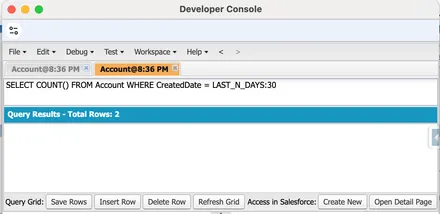
LAST_N_DAYS:30 includes today, so both accounts created today are in the count.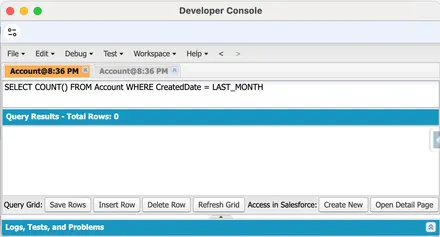
LAST_MONTH covers only the previous calendar month, so today’s two accounts are excluded.This org held only those two records, so LAST_N_DAYS:30 returns 2 while LAST_MONTH returns 0: the accounts created today count towards the rolling window and are excluded from the previous calendar month. In a populated org the two totals would not line up so neatly, because the windows cover different date ranges, but the behaviour that matters is the same, today’s records count for LAST_N_DAYS and never for LAST_MONTH. That is exactly the today-inclusion behaviour the table below describes.
🧭 Which Literal for Which Reporting Ask
Section titled “🧭 Which Literal for Which Reporting Ask”Date literals are easy to look up but easy to misapply, because the label rarely matches the business question word for word. This table maps the asks that come up most often to the literal that answers them, and the boundary detail that catches people out.
| Business ask | Reach for | Watch out for |
|---|---|---|
| Records dated today | = TODAY |
Resolves in the running user’s timezone, so it is already local-correct. |
| Yesterday only | = YESTERDAY |
A single 24-hour window, nothing before or after. |
One specific day, n days back |
= N_DAYS_AGO:n |
One day only, and it excludes today. |
| Rolling “last 30 days” | = LAST_N_DAYS:30 |
Includes today, so it actually spans 31 calendar days (30 days ago through now). |
| The previous full calendar month | = LAST_MONTH |
The whole prior month, not “the last 30 days”. |
| Month to date (1st through today) | no dedicated literal | = THIS_MONTH works only if the field cannot hold future dates; otherwise it also pulls records dated later this month. |
| The current quarter | = THIS_QUARTER (or = THIS_FISCAL_QUARTER) |
Pick the fiscal variant if the business reports on a fiscal calendar set in Setup. |
| The upcoming week’s work | = NEXT_WEEK (or = NEXT_N_WEEKS:1) |
Starts on the first day of next week, not a rolling seven days from today. |
| The next 7 days | = NEXT_N_DAYS:7 |
Starts tomorrow; today is excluded entirely. |
| This calendar year | = THIS_YEAR |
Includes future-dated records in the year; for year to date, bound it the same way as month to date. |
💡 Practical Tips
Section titled “💡 Practical Tips”- Know the period, not just the label:
LAST_MONTHis the full previous calendar month, not “the last 30 days.” UseLAST_N_DAYS:nwhen you need a rolling day count. - Know which literals include today:
LAST_N_DAYSandLAST_90_DAYSrun through the current moment, so today’s records are in scope.NEXT_N_DAYSandNEXT_90_DAYSstart tomorrow and exclude today entirely. For weeks, months, quarters, and years, both theLAST_NandNEXT_Nvariants exclude the current period altogether:LAST_N_WEEKS:2never returns records from the current week. - Fiscal literals follow org settings:
THIS_FISCAL_QUARTERand related literals depend on your org’s fiscal year configuration in Setup. - Combine with other filters: Date literals work well alongside ownership, status, and relationship filters in the same
WHEREclause. - Test in your org: Run queries in Developer Console or
sf data queryand confirm row counts, especially for dynamic literals and week boundaries.
✅ Conclusion
Section titled “✅ Conclusion”Date literals keep SOQL date filters readable and maintenance-free. Fixed literals cover standard reporting periods; dynamic literals with :n cover rolling windows. Use them in WHERE clauses on date fields, validate results in your org, and pair them with the rest of your filter toolkit for precise, time-aware queries.
For further reading, see the official Salesforce date formats and literals documentation.
🔜 Your Next Steps
Section titled “🔜 Your Next Steps”- Compare a fixed and a rolling window: Run
LAST_MONTHagainstLAST_N_DAYS:30on the same field and note how the row counts differ. - Prove the today boundary: Confirm for yourself that
LAST_N_DAYS:7includes today whileNEXT_N_DAYS:7does not. - Check your fiscal calendar: Run a
THIS_FISCAL_QUARTERquery and compare it against your org’s fiscal year settings in Setup.
Next, move on to SOQL: A Guide to Date Functions to extract parts of a date, convert time zones, and group records by calendar or fiscal periods.