Salesforce Evolution of Frameworks — UI Fundamentals

Welcome to the Salesforce UI Developer Guide. Salesforce has one of the most unusual UI landscapes in enterprise software. In a single org you can encounter Visualforce pages, Aura components, Lightning Web Components (LWC), the occasional S‑control still hanging on from the mid‑2000s, and even embedded React or Angular apps wrapped inside LWCs. That mix isn’t really “old versus new”. Each framework is a snapshot of where web development had got to when Salesforce adopted it, and the platform has never forced you to remove the older ones.
This guide series is designed to make sense of that landscape. Across the coming parts, we’ll look at: How each Salesforce UI technology emerged, the problems it was built to solve at the time, how it behaves in practice inside a modern org, and how to choose the right tool for real‑world development and architecture.
Where exact platform behaviour matters, I’ve linked Salesforce’s official docs so you can confirm it against the current release.
Most articles about Salesforce UI focus on a single technology in isolation, usually LWC. This series takes a different approach. It connects the eras, the design decisions, and the trade‑offs that shaped the platform. By understanding the full progression, you’ll be able to reason about the UI stack with more confidence, whether you’re maintaining legacy pages or designing new, standards‑based interfaces.
In this first article, we explore the evolution of Salesforce UI frameworks, from the server-rendered days of Visualforce, through the component based architecture of Aura, to the modern, standards-aligned world of Lightning Web Components. Subsequent articles will dive deeper into each technology, providing you with the foundation to build a cohesive, maintainable UI strategy across the entire platform.
👥 Who this guide is for
Section titled “👥 Who this guide is for”This series is primarily aimed at people who are new to Salesforce UI development and want to understand the platform’s UI landscape before diving into code. If you’ve heard terms like Visualforce, Aura, and LWC but aren’t sure how they relate to each other or which one you should actually be learning, this is the right starting point.
It’s also useful for admins and developers who have been working on the platform for a while but have only ever touched one part of the UI stack and want a clearer picture of how the pieces fit together.
You do not need to be an expert to start, but a little context makes everything here land faster. UI components spend most of their time displaying and saving record data, so if the Salesforce data model and Apex basics are new to you, skim those first and come back.
🚫 What this guide does not cover
Section titled “🚫 What this guide does not cover”- Step-by-step migration patterns. Converting Aura or Visualforce to LWC component-by-component is out of scope; the focus is on when and why to migrate, not the mechanics of each refactor.
- Locker Service and Lightning Web Security internals. Security boundaries and namespace isolation are touched on in the Aura and LWC articles; this guide does not go deep on the security runtime.
- Performance benchmarking. Framework trade-offs are covered conceptually; profiling and measurement are out of scope.
- The declarative UI layer in depth. This series is about building UI with code, but the best UI is often no code at all. Where configuration is the better answer, Advanced UI Customisation covers Lightning App Builder, Dynamic Forms, and record-page design — worth reading before you reach for a component.
🧭 How to use this guide
Section titled “🧭 How to use this guide”- Start with the timeline to orient yourself to when each framework arrived, its current status, and what it replaced.
- Use the decision table when you need a quick answer on which technology to reach for or how to frame a migration conversation.
- Follow the links to go deeper. Each framework has a dedicated article in this series — jump to whichever is most relevant to your current work.
🧬 The Evolution of Salesforce UI Frameworks
Section titled “🧬 The Evolution of Salesforce UI Frameworks”The story of Salesforce UI development is really the story of the web itself. Every major UI framework on the platform reflects a different era in frontend engineering: from server-rendered pages, to proprietary component models, to standards-based web components. To understand why Lightning Web Components (LWC) matter so much today, it helps to understand the frameworks that came before them and the problems they were designed to solve.
🕰️ In the early days: S-Controls and customisation before structured UI
Section titled “🕰️ In the early days: S-Controls and customisation before structured UI”Before Salesforce had a proper UI framework, developers who needed custom interfaces relied on S-controls (short for “Salesforce controls”). Introduced in the early 2000s, S-controls were snippets of HTML and JavaScript that Salesforce hosted and rendered inside an inline frame (iframe) within the platform UI. They could be attached to custom buttons, links, or embedded directly into page layouts.
<!-- Simplified example of an old-style S-control concept --><html> <head> <script> function sayHello() { alert('Hello from early Salesforce customization'); } </script> </head> <body> <h1>Custom UI</h1> <button onclick="sayHello()">Click Me</button> </body></html>An S-control was essentially a standalone HTML page that happened to live inside Salesforce. It had no built-in connection to the platform’s data model, security rules, or page lifecycle. If you needed to read or write Salesforce data, you had to make your own AJAX calls to the Salesforce API from JavaScript. There were no standard controllers, no merge field expressions, and no server-side data binding.
This created several problems that became more serious as orgs grew:
- No platform integration. S-controls ran in isolation inside an iframe. They could not share data, styles, or behaviour with the surrounding Salesforce page without writing custom JavaScript to pass information between the iframe and the main page.
- Security gaps. Because S-controls were raw HTML and JavaScript with no Salesforce controller layer, they were vulnerable to cross-site scripting (XSS). Data access depended on the API calls and security decisions made by the original developer rather than a framework-managed UI pattern.
- Maintenance burden. Each S-control was a self-contained page. There was no component model, no reuse, and no framework-level conventions. As teams built more customisations, the result was a fragmented collection of standalone pages with duplicated logic.
- Performance. Every S-control loaded in its own iframe, adding overhead to page rendering. Pages with multiple S-controls could become noticeably slow.
Salesforce began deprecating S-controls in 2007, and by 2009 had removed the ability to create new ones. However, existing S-controls were not deleted, and a small number still exist in very old orgs today. Most Salesforce developers will never encounter one.
I’ve come across a single S-control in my entire career: on an established client org, buried behind a custom button that opened something that looked nothing like a standard Salesforce page. I had no idea what I was looking at, and I wouldn’t have recognised it without a colleague who had more years on the platform. That’s the thing with S-controls: if you’ve never been told they exist, you won’t know what you’re looking at when you find one. The tell is a custom button pointing to an iframe-rendered HTML page with direct API calls inside it, and what you do next matters.
S-controls were a product of their time: the web lacked mature component models, and Salesforce needed to give customers some way to extend the UI. But their limitations made it clear that the platform needed a framework with proper data binding, server-side logic, and built-in security. That framework arrived in 2008 as Visualforce.
📜 The Visualforce Era (2008): The server-side foundation
Section titled “📜 The Visualforce Era (2008): The server-side foundation”In 2008, Salesforce introduced Visualforce, a framework that allowed developers to build custom user interfaces using a tag‑based markup language similar to HTML. It was a major step forward because it gave developers a supported way to create custom pages that worked closely with Salesforce data and controllers. Standard controllers enforce the running user’s object, field, and record access; custom controllers give developers more control and therefore require deliberate security enforcement.
Even a minimal Visualforce page makes the model clear:
<apex:page> Hello {!$User.FirstName}!</apex:page>The key thing to notice is that this is not just raw browser HTML. The {!$User.FirstName} expression is evaluated on the Salesforce server before the response reaches the browser. This server-side evaluation gives Visualforce its tight integration with platform data and page context, and it is also why interaction-heavy Visualforce pages can feel slower than modern single-page applications. Every state change that requires new data means a round trip to the server.
Visualforce followed a page-centric, server-rendered model. When a user requested a page, the Visualforce markup was processed on the server, combined with data from controllers and components, and rendered into standard HTML before being sent to the browser. In practice, this meant that many user interactions triggered full-page refreshes or partial rerenders, because the state and layout changes were recomputed on the server each time.
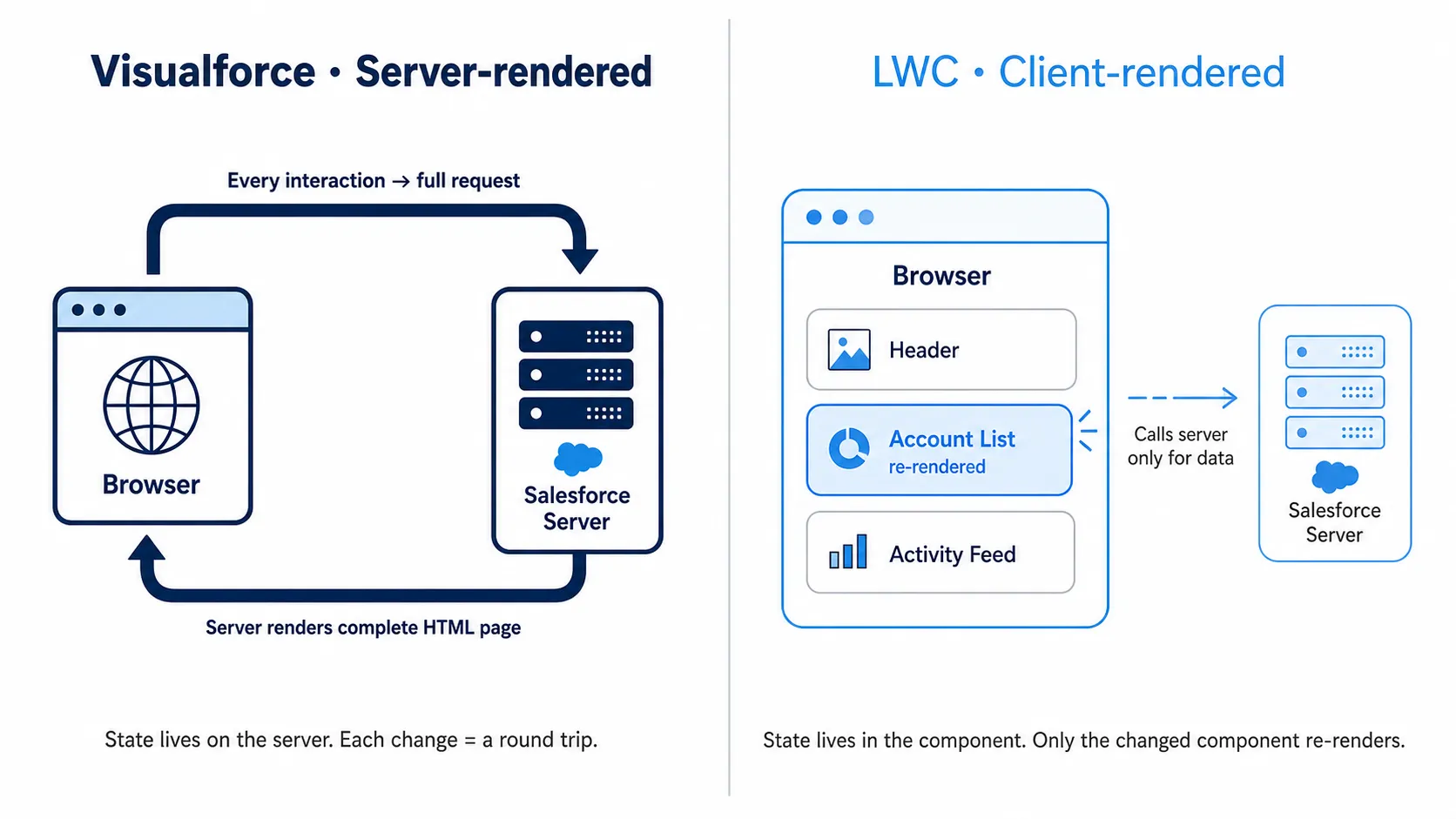
Compared with modern web applications, the experience could feel slower and less dynamic, but at the time it was a powerful and productive model for building custom business applications quickly. Developers could rely on familiar, page‑oriented patterns and handle complex logic and data access close to the platform’s core services.
Visualforce remains important even today. Many legacy Salesforce implementations still rely on it, and it continues to be useful in specific scenarios. In practice, the Visualforce I still touch on real projects is almost never a full custom UI; it’s a PDF-rendering page generating a quote or invoice, doing a job that no Lightning equivalent can. More than once I’ve watched a team scope a “remove all the Visualforce” project, only to discover that one of those pages was the engine behind a document customers actually receive. Before you treat a Visualforce page as dead weight, find out what it produces and who depends on the output.
🔥 The Aura Revolution (2014): The birth of Lightning
Section titled “🔥 The Aura Revolution (2014): The birth of Lightning”As web development moved toward single-page applications (SPAs) and rich client-side interactivity, Salesforce responded with the Lightning Component framework, built on the Aura framework. Aura was a custom, proprietary framework developed specifically for Salesforce to power dynamic, component‑based UIs. This marked the beginning of the Lightning era and introduced a major shift in how Salesforce UI was designed and delivered.
Aura brought a component-based architecture to the platform. Instead of building one large page, developers could now compose interfaces from smaller reusable components, each with its own markup, styling, behaviour, and events. Rendering moved primarily to the client side, with JavaScript handling UI behaviour in the browser and server calls used mainly for data access.
<aura:component> <div class="slds-p-around_medium"> Hello from Aura </div></aura:component>The key thing to notice is the component wrapper itself. The UI is no longer defined as one server-rendered page but as a reusable unit inside the Lightning framework. State lives inside the component, not the server. When a property changes, only the component re-renders, not the whole page. This is the fundamental shift that made Lightning applications feel more responsive than Visualforce.
Rendering moved primarily to the client side, with JavaScript handling UI behaviour in the browser and server calls used mainly for data access. This change made Salesforce applications feel more interactive and responsive, and it aligned the platform more closely with the direction of modern frontend development.
However, Aura was built before the web platform had fully matured. Browsers did not yet natively support many of the features required for modern component frameworks, so Salesforce had to build its own abstractions for component lifecycle, events, and rendering.
That design made Aura powerful, but also relatively heavy. Salesforce documentation describes Aura as a richer runtime than the newer standards-based LWC layer, which can make it more complex to maintain. Aura developer docs. Developers had to learn framework-specific patterns, proprietary event models, and Salesforce-specific conventions that did not transfer as cleanly to the broader web ecosystem. Aura was a necessary transition technology, but it also revealed the limits of a custom framework layer built ahead of the browser platform.
⚡ The LWC Paradigm Shift (2019): Embracing web standards
Section titled “⚡ The LWC Paradigm Shift (2019): Embracing web standards”By 2019, the web had changed significantly. Modern browsers now supported many of the features that Aura had once needed to simulate, including custom elements, templates, modules, and other standardised browser capabilities. Salesforce used this shift as the foundation for Lightning Web Components (LWC).
LWC is a modern, lightweight framework built directly on web standards. Instead of wrapping UI inside a large, proprietary runtime like Aura did, LWC builds on the browser’s native component model and only adds Salesforce‑specific services (like data binding, metadata, and security) where needed. The result is better performance, a cleaner model, and a development experience that feels much closer to mainstream frontend engineering.
Even a minimal LWC shows how close it feels to modern web development:
<template> <p>Hello from Lightning Web Components</p></template>import { LightningElement } from 'lwc';
export default class HelloWorld extends LightningElement {}The key thing to notice is the separation of concerns and the familiarity of the syntax. The template looks like standard HTML, the JavaScript looks like standard ES6+, and the extends LightningElement class maps directly to the HTML custom elements specification. This means the mental model you build for LWC is largely transferable to non-Salesforce web development, which is a deliberate design choice.
For Salesforce developers, this was a major turning point. Building UI in LWC meant working with standard JavaScript, HTML, and CSS in a way that was more intuitive, more portable, and easier to align with modern web development practices. For teams hiring or upskilling developers, it also reduced the gap between Salesforce UI development and the broader front‑end world.
LWC did not instantly replace Aura everywhere, and both frameworks still coexist on the platform. But Salesforce’s direction became clear: for most new UI development, LWC is generally the preferred model because it is faster, simpler, and more aligned with where the web is going. LWC developer guide.
🌐 Why Salesforce moved from Aura to LWC
Section titled “🌐 Why Salesforce moved from Aura to LWC”The shift from Aura to LWC wasn’t cosmetic. It followed a deeper change in the web stack, and in Salesforce’s own platform strategy.
- The web platform had matured. Features that once required a custom framework layer were now available natively in modern browsers.
- Performance mattered more. LWC reduced framework overhead and allowed the browser to do more of the work directly.
- Developer experience improved. Standard JavaScript and web component concepts are easier to learn, easier to test, and more transferable.
- Alignment with industry standards became strategic. Salesforce could modernise its platform while making UI development feel more familiar to the wider frontend community.
| Feature | Aura Framework (2014) | Lightning Web Components (2019) |
|---|---|---|
| Architecture | Proprietary Component Model | Standard Web Components |
| Performance | Heavy JavaScript on the client | Native browser execution (fast) |
| Language | ES5 JavaScript | Modern ES6+ JavaScript |
| Interoperability | Limited to Aura ecosystem | Compatible with standard web tools |
| Learning Curve | High (Salesforce-specific) | Low (Standard Web Skills) |
Aura covered the gap until browsers caught up, and LWC is what that looked like once they did.
🗓️ Framework timeline
Section titled “🗓️ Framework timeline”| Technology | Introduced | Status | Notes |
|---|---|---|---|
| S-controls | Early 2000s | Deprecated 2007, creation removed 2009 | Replace any remaining instances immediately |
| Visualforce | Winter ‘08 | Still supported, no deprecation announced | PDF rendering and server-driven layouts remain valid use cases |
| Aura | Winter ‘15 | Still supported; generally not preferred for new greenfield work | LWC is generally preferred for most new UI development from 2019 onward |
| LWC | Spring ‘19 (GA) | Salesforce’s strategic UI direction | Use for all new custom UI |
Sources: Visualforce Developer Guide, Aura Components Developer Guide, Lightning Web Components Developer Guide
📋 When to use each technology today
Section titled “📋 When to use each technology today”Use this table when you are deciding which framework to reach for, or when advising on a migration priority.
| Technology | Still supported? | Best use case today | Avoid when… | Migration priority |
|---|---|---|---|---|
| S-controls | No | None | Always | Critical: replace immediately |
| Visualforce | Yes | PDF generation, printable views, server-driven document layouts | Building interactive or component-based UI | Low: maintain until business case justifies rewrite |
| Aura | Yes (not preferred) | Maintaining existing components, wrapping LWC for older APIs | Starting a new feature from scratch | Medium: migrate opportunistically, not wholesale |
| LWC | Yes (strategic) | All new custom UI, standard component extensions, Experience Cloud | None | Use by default |
⚠️ Common Misconceptions
Section titled “⚠️ Common Misconceptions”These are the patterns that most often trip up developers who are new to the Salesforce UI stack.
- “Aura is basically dead, I can ignore it.” Aura is fully supported and you will encounter it in almost every established org. Dismissing it without understanding it leads to bugs in mixed-framework pages, broken event handling, and missed opportunities to reuse components that are already working well. Learn it properly even if you build everything new in LWC.
- “LWC is always faster than Aura.” LWC has lower framework overhead, but a poorly structured LWC that re-renders frequently or makes unnecessary Apex calls will perform worse than a well-tuned Aura component. The framework is not a substitute for sound design.
- “Visualforce is gone.” It is not. Many orgs still actively deploy Visualforce pages, and PDF generation has no LWC equivalent. Developers who refuse to read Visualforce code are a liability in a support or audit scenario.
- “Aura patterns translate directly to LWC.” They do not. Common examples:
cmp.find('myId')for DOM element references becomesthis.template.querySelector('[data-id="myId"]')in LWC. Aura’s application and component events have no equivalent in LWC; you use custom DOM events and Lightning Message Service instead. Assuming parity leads to frustrating debugging sessions. - “Aura and LWC nest freely in either direction.” They do not. An Aura component can contain an LWC, but an LWC cannot contain an Aura component. This one rule shapes nearly every real migration: you migrate from the inside out, replacing leaf components with LWC first and keeping an Aura wrapper at the top until the whole tree is converted. Plan a migration the other way around and you will hit a wall the first time you try to drop an Aura component inside your new LWC.
- “I only need to learn LWC.” If you are joining any team working on a Salesforce org that is more than a couple of years old, you will read Aura and Visualforce code in your first week. Context for why those patterns exist makes you far more useful than someone who can only work on greenfield components.
🧭 Why this history matters
Section titled “🧭 Why this history matters”Knowing this progression is practical, not just trivia. It explains why Salesforce UI development looks the way it does today, why some orgs still contain a mix of Visualforce, Aura, and LWC, and why architectural decisions in Salesforce often reflect both technical history and platform evolution.
If Visualforce was the era of server-driven customisation, and Aura was the era of proprietary client-side components, then LWC is the era of standards-based Salesforce UI engineering. That shift is why modern Salesforce UI work feels close to ordinary web development rather than a separate world with its own rules.
In the next parts of this series, we’ll move from this broad evolution to concrete, day‑to‑day patterns:
- How to read and maintain Visualforce pages without rewriting them.
- How to reason about Aura components in a mixed-framework org.
- How to structure LWCs so they are modular, testable, and aligned with modern web practices.
🚀 Next steps
Section titled “🚀 Next steps”The next article dives into Visualforce: the server-driven foundation that still powers many Salesforce interfaces. You will see how page-centric design shaped the platform’s UI instincts and why Visualforce remains a key piece of the puzzle even in modern Lightning-centric orgs.